To start using CloudBees Smart Tests features, you must send build and test data from your CI pipeline to your CloudBees Smart Tests workspace.
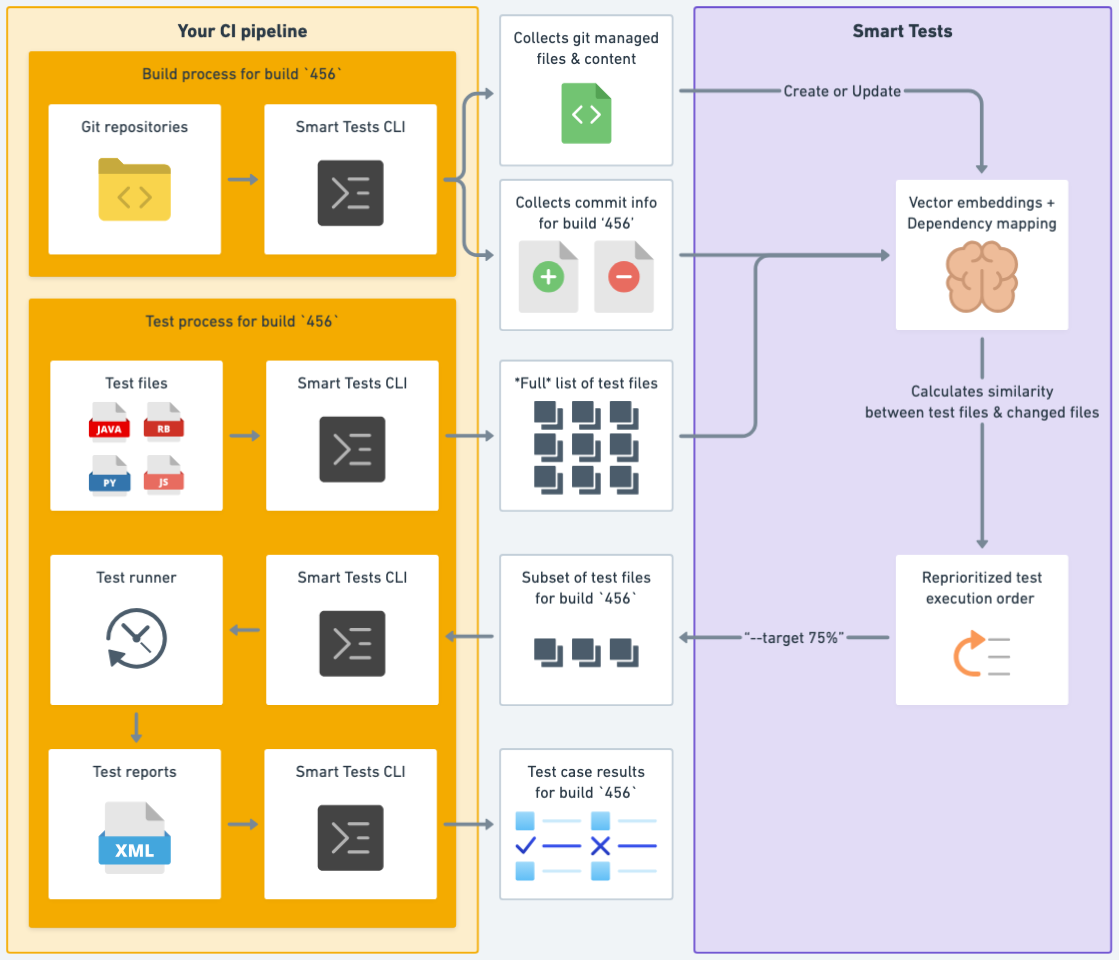
The following diagram shows the high-level data flow:
Integration options
CloudBees Smart Tests CLI
We support a variety of tools to integrate with, all through the CloudBees Smart Tests CLI. Tools supported include: Android Debug Bridge, Ant, Bazel, Behave, CTest, cucumber, Cypress, GoogleTest, Go Test, Gradle, Jasmin, Jest, Maven, minitest, pytest, Robot, Rspec, and other/custom test runners.
First, follow the steps in Getting started to create your account, set up your API key, install the CloudBees Smart Tests, and verify your connection.
Then complete the steps for sending your test suite’s data to your CloudBees Smart Tests workspace:
Next steps
Once you start sending builds and test results to CloudBees Smart Tests, you will see the benefits of CloudBees Smart Tests in your test sessions. Here are some next steps to take to get the most out of CloudBees Smart Tests:
-
Set up Test Notifications via Slack or GitHub app for test sessions to get notified about test results without having to check email or navigate to a pull request.
-
View features:test suite trends and insights/trends.adoc in your test sessions.
-
Find features:test suite trends and insights/unhealthy-tests.adoc in your test suite and fix them to run tests more reliably.
-
Begin saving time running tests and run tests earlier with Predictive Test Selection.