Replace static, pre-defined parallel test suites with CloudBees Smart Tests dynamic parallel subsets. Many teams already parallelize their test suites to reduce wall-clock time for their test workload; dynamic subsets let you keep that parallel structure while splitting the contents of each parallel bin in a more balanced way.
In CloudBees Smart Tests, the subset workflow builds in parallelization. Instead of manually assigning tests to fixed bin/shards, CloudBees Smart Tests:
-
Generates an optimal subset, ordering tests based on file changes, and then
-
splits that set into evenly sized bins at runtime.
As a result, there is no longer a need to maintain static test groupings to achieve parallelism.
How dynamic parallel subsets work
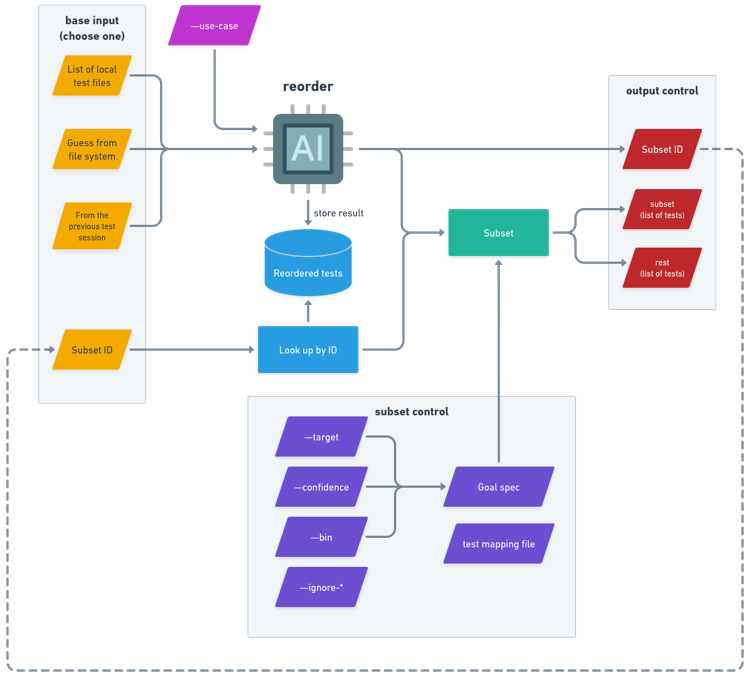
The underlying mechanism behind subsetting enables this approach. The act of generating a subset actually involves two separate steps:
-
Reordering:
-
Producing an optimized, similarity-based ordered list of tests.
-
-
Subsetting:
-
Selecting a portion of tests from that list.
-
This approach combines straightforward steps: reordering, then splitting the subset.
For example, say a full test suite takes ~80 minutes to run. In a static environment, it is split manually into four static suites and run them across four workers:
-
Worker 1: ~20 minutes
-
Worker 2: ~15 minutes
-
Worker 3: ~20 minutes
-
Worker 4: ~25 minutes
Even with parallelization, these bins are:
-
unevenly balanced,
-
brittle as tests change over time, and
-
expensive to maintain.
In a dynamic environment, CloudBees Smart Tests follows this workflow:
-
Request a subset and generate input snapshot ID:
-
CloudBees Smart Tests first decides which tests should run and in what order for this build. This produces a single logically ordered subset representing part of the original 80-minute suite.
-
At the same time, it prints an input snapshot ID, which represents the exact ordered list of tests that workers use for splitting in later steps. Recording tests once and reusing the same order across workers ensures deterministic splits.
-
-
Split the subset across workers:
-
Each parallel worker calls the subset command with its bin number (for example, 1/4, 2/4, and so on) and referencing the same input snapshot ID.
-
CloudBees Smart Tests returns only the tests for that bin, balanced by historical execution time. Together, all bins cover the full subset with no overlap.
-
-
(Optional) Apply additional subset controls:
-
When requesting a bin, users may optionally apply additional subset controls (such as confidence, duration targets or a goal such as ignoring flaky tests).
-
Because CloudBees Smart Tests calculates the split dynamically at runtime, each bin tends to complete at roughly the same time, reducing idle workers and overall CI duration.
What dynamic parallel subsets look like in practice
Here’s an example of how this works in practice with the CloudBees Smart Tests CLI. In this example, we have a test suite that we want to run across four parallel workers. First, request a subset for the build and session, and then each worker requests its assigned bin of tests to run.
$ smart-tests record build --build $BUILD_ID --source src/. $ smart-tests record session --build $BUILD_ID --test-suite unit-test > session.txt # Recommended: How to issue an input snapshot ID and run a parallel test $ find ./tests/**/*.py | smart-tests subset file --session @session.txt --print-input-snapshot-id 4567 # worker 1 $ smart-tests subset file --session @session.txt --confidence 90% --input-snapshot-id 4567 --bin 1/4 > subset.txt << Execute the tests listed in subset.txt >> $ smart-tests record tests file --session @session.txt <REPORT_FILES> # worker 2 $ smart-tests subset file --session @session.txt --confidence 90% --input-snapshot-id 4567 --bin 2/4 > subset.txt << Execute the tests listed in subset.txt >> $ smart-tests record tests file --session @session.txt <REPORT_FILES> # worker 3 $ smart-tests subset file --session @session.txt --confidence 90% --input-snapshot-id 4567 --bin 3/4 > subset.txt << Execute the tests listed in subset.txt >> $ smart-tests record tests file --session @session.txt <REPORT_FILES> # worker 4 $ smart-tests subset file --session @session.txt --confidence 90% --input-snapshot-id 4567 --bin 4/4 > subset.txt << Execute the tests listed in subset.txt >> $ smart-tests record tests file --session @session.txt <REPORT_FILES> # Optional: When tests cannot be listed in advance # Depending on the timing, there is a risk of duplicate or missing test cases. # worker 1 $ find ./tests/**/*.py | smart-tests subset file --session @session.txt --confidence 90% --bin 1/4 > subset.txt << Execute the tests listed in subset.txt >> $ smart-tests record tests file --session @session.txt <REPORT_FILES> # worker 2 $ find ./tests/**/*.py | smart-tests subset file --session @session.txt --confidence 90% --bin 2/4 > subset.txt << Execute the tests listed in subset.txt >> $ smart-tests record tests file --session @session.txt <REPORT_FILES> # worker 3 $ find ./tests/**/*.py | smart-tests subset file --session @session.txt --confidence 90% --bin 3/4 > subset.txt << Execute the tests listed in subset.txt >> $ smart-tests record tests file --session @session.txt <REPORT_FILES> # worker 4 $ find ./tests/**/*.py | smart-tests subset file --session @session.txt --confidence 90% --bin 4/4 > subset.txt << Execute the tests listed in subset.txt >> $ smart-tests record tests file --session @session.txt <REPORT_FILES>
Benefits of dynamic parallel subsets
Dynamic parallel subsets provide several benefits over static parallel suites:
-
They remove hard-coded test groupings from your CI configuration.
-
They adapt automatically as tests are added, removed, or their duration changes.
-
They keep parallel execution while also benefiting from Predictive test selection.
-
They retry individual bins deterministically when needed.