|
This page relates to Record builds with CloudBees Smart Tests. |
Multiple repositories combined in one build then tested
If you produce a build by combining code from several repositories (like the diagram below), invoke smart-tests record build with multiple --source options to denote them.
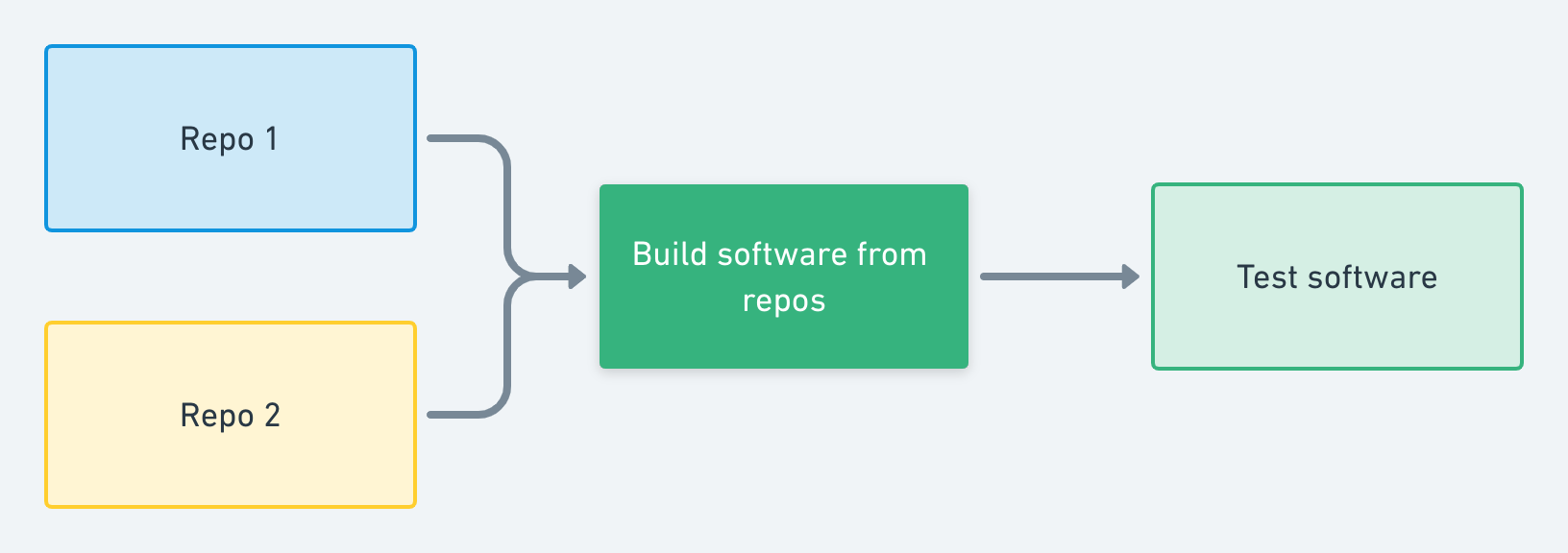
To differentiate them, provide a label for each repository in the form of LABEL=PATH:
# record the build smart-tests record build --build <BUILD NAME> --source main=./main_repo --source lib=./lib_repo # create the build bundle install
|
The |
Multiple repositories built/deployed separately then tested together (for example, microservices)
Some teams run regression tests against an environment where several services have been deployed. Each service is built from code from its own repository (or set of repositories).
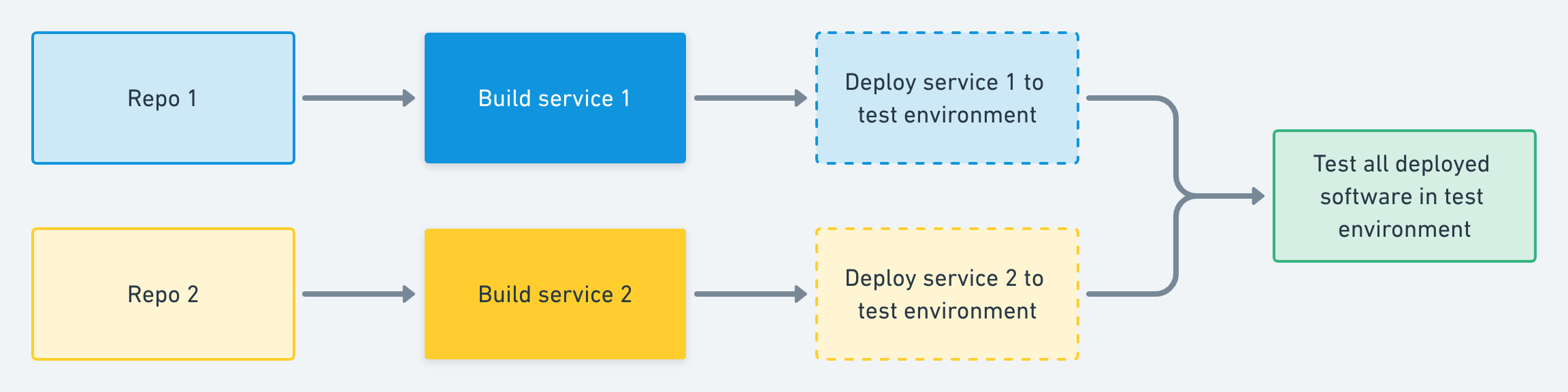
The intent of recording a build is to capture the version of the software being tested. In this scenario, the version of the software being tested is effectively the combination of all versions of the components deployed to the test environment.
For example, if the currently deployed version of service 1 is d7bf8b7c (from repo 1) and the currently deployed version of service 2 is c39b86a1 (from repo 2), then the effective version of the software being tested can be interpreted as:
[ { repository: "repo1", commit: "d7bf8b7c" }, { repository: "repo2", commit: "c39b86a1" } ]
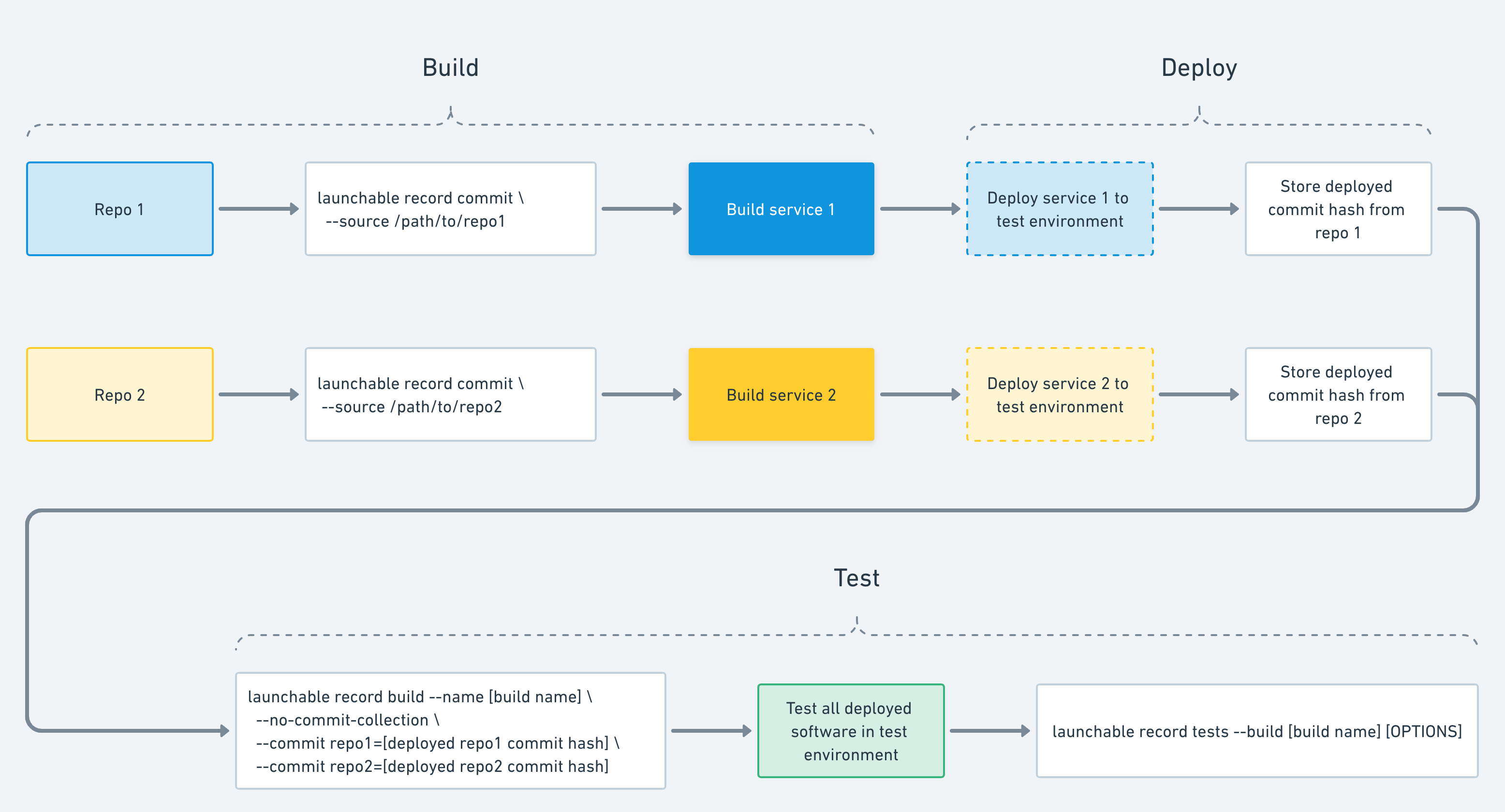
This interpretation is no different from the diagram above. However, because you want to capture the versions of all the deployed software being tested, you need to run smart-tests record build right before running tests — for example, in the green box in the diagram above.
This presents a challenge because the repos for each service are usually not available at this stage (and cloning them just for this purpose would be inefficient). Luckily, when you run smart-tests record build , the CLI actually performs two functions that we can split up to support this use case:
-
Recording all new commits from included repositories, and
-
Recording the build itself, 'tagged' with the HEAD commit from each included repository.
The CLI further provides options to separate these:
-
Record commits in each component’s build process.
-
Record the "combined" build itself right before you run tests.
The commands and options that enable this are:
-
smart-tests record commit --source /PATH/TO/REPO, can record commits separately in each component’s build process. -
Two
smart-tests record buildoptions:-
--no-commit-collectiondisables commit collection (since you’re doing it separately), and -
--commit REPO=HASHallows you to 'tag' the build with each repository.This means that the deployed version of each service needs to be available to the process where you run tests.
-
These commands and steps are shown in the white boxes in the expanded diagram below.
Incremental build over multiple repositories
Some teams have a software project that spans a large number of repositories, with a build system that supports the incremental build with object cache. Only the "changed" repositories are cloned locally and built, and the reamining artifacts for the "unchanged" repositories get pulled from a remote/distributed object cache. The end result is that each build clones a different subset of repositories.
One such example is Android + RBE. Two repositories (zooma & fft2d) are "changed" and thus cloned locally to be built. One repository (av framework) is "unchanged" and its build artifacts will be pulled from a remote cache, so there’s no local clone of this repository. Even though this repository is not cloned, there’s still a commit hash (d3427bd) associated with it.
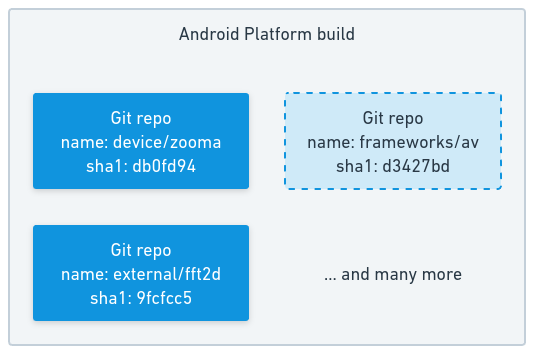
The intent of recording a build is to capture the version of software being assembled, which includes portions that are not built and simply cached. To achieve this;
-
For the "changed" repositories, let CloudBees Smart Tests collect new commits from a local clone.
-
For the "unchanged" repositories, tell CloudBees Smart Tests that the build will use a certain commit that is not provided locally.
The commands and options that achieve this are:
-
For each "changed" repository, there should be a local clone,
-
Run
smart-tests record commit --source path/to/repo, which lets you record commits from this repository.
-
-
Make one smart-tests record buildinvocation with the following:-
--commit REPO=HASHfor each repository, changed or unchanged. If the repository was changed, therecord commitcommand earlier should have collected this commit hash. If the repository was not changed, there should have been some earlier builds that cloned this repository and the hash locally, for whichrecord commitcommand had run. -
--no-commit-collectionoption, which disables commit collection, since you are doing it in separaterecord commitinvocations.
-
With the above example, the list of eventual invocations are:
smart-tests record commit --source device/zooma=path/to/zooma smart-tests record commit --source external/fft2d=path/to/fft2d smart-tests record build --build SOMETHING --no-commit-collection \ --commit device/zooma=db0fd94 \ --commit external/fft2d=9fcfcc5 \ --commit frameworks/av=d3427bd