CloudBees Smart Tests is a software development intelligence platform focused on continuous integration (CI). Using data from your CI runs, CloudBees Smart Tests provides various features to speed up your testing workflow so you can ship high-quality software faster.
Predictive test selection
Predictive test selection uses large language models (LLMs) to understand your code changes and automatically identify the most relevant tests to run.
By analyzing both source code and test files, CloudBees Smart Tests builds a deep understanding of how your code is structured and how different components relate to one another. Using commit information, it calculates the similarity between changed files and test files to determine which tests are most likely impacted — producing an optimized test execution plan where critical tests are prioritized and redundant ones are safely skipped.
With Predictive test selection, CloudBees Smart Tests brings code-aware test execution intelligence to your CI process — helping teams run fewer but relevant tests, gain faster feedback, and ship high-quality software with confidence.
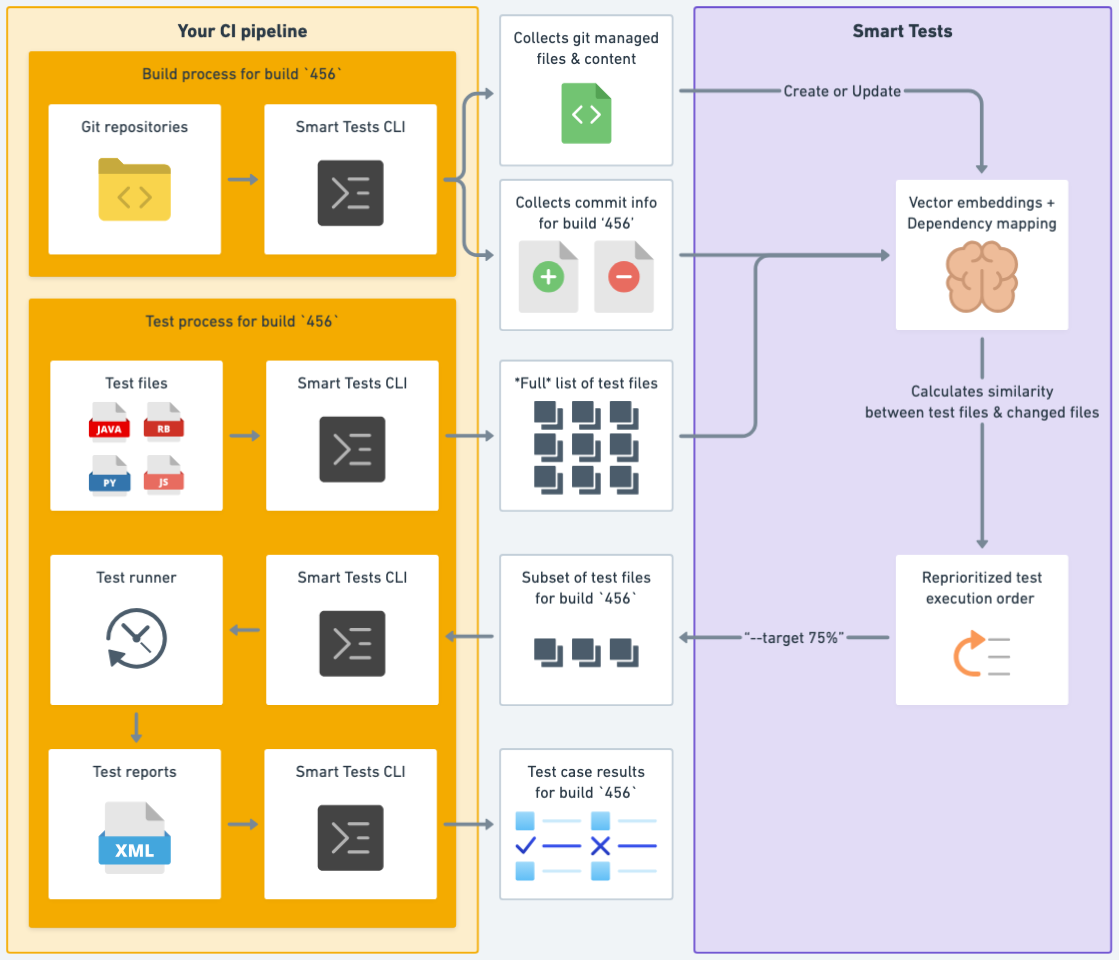
For more information, refer to Predictive test selection.
Test suite trends
To see aggregate info about your test sessions, including average test session duration, test session frequency, and how often sessions fail refer to test suite trends.
Seeing this data over time gives you a picture of how your test suite evolves; for example, perhaps tests are taking twice as long as they did six months ago, and you need to cut it down! Similarly, perhaps your team’s running tests a lot more often than expected, driving up resource costs. Or maybe there are some broken tests that are driving up the overall failure rate.
Unhealthy tests
CloudBees Smart Tests also surfaces unhealthy tests within your test suite allowing you to fix them and run tests more reliably.
Test reports
As test results are sent to CloudBees Smart Tests using the CloudBees Smart Tests CLI, you can view those test results and reports in the CloudBees Smart Tests dashboard. CloudBees Smart Tests provides a richer view of test results, helping developers triage and fix failures more quickly.
For quick access, the CloudBees Smart Tests CLI prints out a link to the results view every time you record results. In addition, CloudBees Smart Tests shows all of your test runs in one place for easy navigation. No more digging around build logs.
Test suite parallelization
Using duration information from past test runs, CloudBees Smart Tests can automatically create evenly-sized bins of tests for you to run your test suite in parallel. For more information, refer to test suite parallelization.
Test Notifications
CloudBees Smart Tests provides test notifications so developers can immediately take action on the results, whether that’s to triage failures or merge a PR. Developers can create subscriptions to receive personal notifications about test sessions run against their branches/pull requests or other test sessions they care about. The following apps are available for receiving notifications:
-
GitHub app: GitHub app for test sessions
-
Slack app: Test Notifications via Slack
The apps will send notifications directly to developers eliminating the need to manually check their email or navigate to their pull request to see if their tests passed.
To sign up for a CloudBees Smart Tests account, refer to https://cloudbees.io and sign up. Once done, you can start sending data to CloudBees Smart Tests.