As a test suite grows, some tests start failing at a high rate - whether consistently run after run, or unpredictably as highly flaky tests. Left unaddressed, these tests create noise that teams learn to tune out, and over time that habit erodes trust in the entire suite.
The High failure rate tests page and Quarantine feature helps with two things: identifying which tests are failing often enough to be a problem, and setting them aside while work to fix them is underway - without removing them from the suite or letting them keep blocking CI.
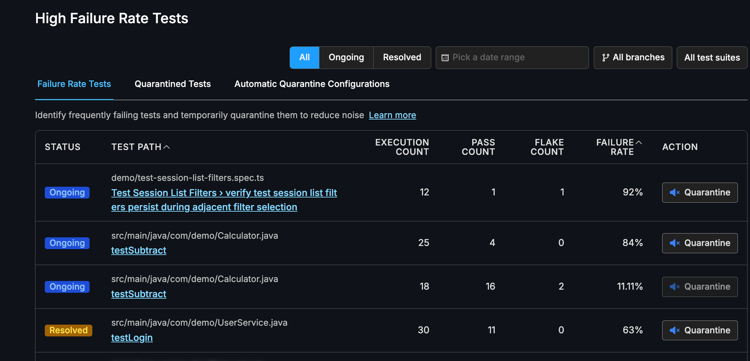
A test’s failure rate is calculated as the proportion of its executions that resulted in a failure over your selected time window. The High failure rate tests page lists all tests that have failed, showing execution count, pass count, failure rate, and flake count for the selected time window.
When a test is quarantined, it continues to execute but its pass/fail result is excluded from your CI pipeline’s pass/fail determination - the rest of the suite continues to provide a reliable signal while the problematic test is being addressed. This exclusion is applied when running smart-tests gate command in your CI.
High failure rate tests
Each test on the page has a status that reflects its current trajectory:
-
Ongoing: The test has been failing and has not passed since it started failing. It remains actively broken.
-
Resolved: The test was failing, but its most recent sessions have returned passing results. It may have recovered naturally, or a fix may have landed.
The table also shows execution count, pass count, flake count and failure rate for the selected time window. This combination matters for prioritization: a test running dozens of times a day at 90% failure rate has a much larger effect on CI signal than one that runs infrequently at the same rate.
Quarantine
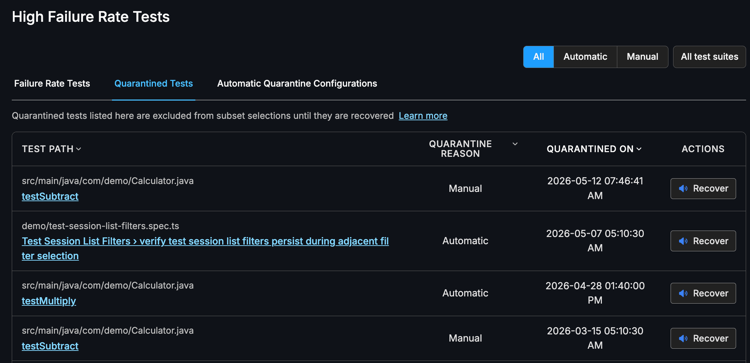
Quarantine is the right choice when a test has a persistently high failure rate and a fix isn’t immediately available. A quarantined test continues to execute with every run, but its pass/fail result does not affect whether your CI pipeline passes or fails. This lets you keep collecting data on the test while ensuring it no longer blocks the team. Quarantine is also explicit and tracked: you can see which tests are quarantined, when they were quarantined, and whether it happened automatically or manually.
Manual quarantine
Manual quarantine provides direct, case-by-case control. When you identify a test on the High failure rate tests page that needs to be set aside, you quarantine it yourself. This is useful when the decision requires judgment — for example, when a test is failing due to a known infrastructure issue that doesn’t warrant removing the test entirely.
|
Tests that are manually quarantined must be manually recovered. |
Automatic quarantine
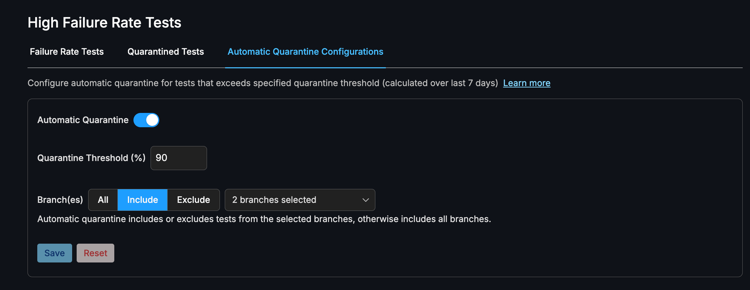
Automatic quarantine lets you define a threshold so that tests exceeding a given failure rate are quarantined without manual intervention. Automatic quarantine applies across all branches by default, with the option to include or exclude specific branches. All configured branches share a single failure rate threshold — it is not possible to set different thresholds per branch. The threshold is evaluated over a rolling 7-day window.
-
Automatic quarantine is disabled by default. It is an opt-in feature that must be explicitly enabled in automatic quarantine configuration tab under high failure rate tests page before use.
-
Automatic quarantine runs once per day. Each run first recovers all automatically quarantined tests alone, then re-quarantines any tests that still exceed the configured failure rate threshold.
Required CI configuration
Regardless of whether you use manual or automatic quarantine, quarantine only takes effect in your pipeline if you update your CI configuration. If the update is not applied, quarantined test failures will still cause your pipeline to fail.
Update existing CI steps
-
Allow test execution to always pass.
-
Add
|| true(or your CI equivalent) after your test run command so that a failing test does not terminate the job before results are recorded:<your test run command> || true
-
-
Add
smart-tests gateaftersmart-tests record tests.-
This command checks the session results against the quarantine list and fails the pipeline only if non-quarantined tests have failed:
smart-tests gate --session "$(cat session.txt)" -
gateexits with a non-zero status if any non-quarantined tests have failed, causing the pipeline to fail as expected. -
It exits with zero if all failures belong to quarantined tests, allowing the pipeline to pass.
-
A complete example of the updated CI steps:
# Run tests — always exits 0 so the job continues <your test run command> || true # Record results smart-tests record tests --session "$(cat session.txt)" file test-results/*.xml # Evaluate: fail pipeline only on non-quarantined failures smart-tests gate --session "$(cat session.txt)"
Recovering a test from quarantine
When a fix has landed and you’re confident a test is no longer broken, you recover it. The test can re-enter normal CI evaluation, and its pass/fail result counts toward build outcomes again.
-
Manual quarantine: Tests that were manually quarantined must be recovered manually from the web-app.
-
Navigate to the Quarantined tests tab in the High Failure Rate tests page.
-
Filter by
Manualto locate the desired tests.
-
-
Automatic quarantine: Tests that were automatically quarantined as per your set threshold, will be automatically recovered once their failure rate falls below the threshold. Since CloudBees Smart Tests does not actually stop running your tests in quarantine mode, we are still able to record its pass/fail behavior and identify if the test is still noisy. This closes the loop for automatically quarantined noisy tests.