Sometimes teams want to observe the potential impact and behavior of running subsets in a real environment before they start using them. In other words, they want to measure the subsets' real-world efficacy against the simulation, as shown in Choose a subset optimization target.
This is done using observation mode, which is a special usage mode of smart-tests record session and, by extension, smart-tests subset. Observation mode is a property of a Test Session, not a Subset.
To enable observation mode, add --observation to the smart-tests record session command to your pipeline after following Subset with the CloudBees Smart Tests CLI:
smart-tests record session --observation <OTHER OPTIONS>
smart-tests record session \ --build $BUILD_NAME \ --observation \ ... [other options]
When observation mode is enabled for a test session, the output of each smart-tests subset command made against that test session will always include all tests, but the recorded results will be presented separately so you can compare running the subset against running the full suite.
For example, you have a test suite with 100 tests that each takes 1 second to run (100 seconds in total):
-
By default, if you request a subset of this test suite with a 30% duration optimization target, the subset output includes 30 tests.
-
However, with observation mode enabled, if you requested a subset of this test suite with a 30% duration optimization target, the subset output would include all 100 tests. CloudBees Smart Tests will recognize this "full session" as a subset observation session when you record results.
Because the session was marked as an observation session, CloudBees Smart Tests can analyze the results of running a subset of tests, such as:
-
Whether the subset would have caught a failing session.
-
How much time could have been saved by running only the subset of tests.
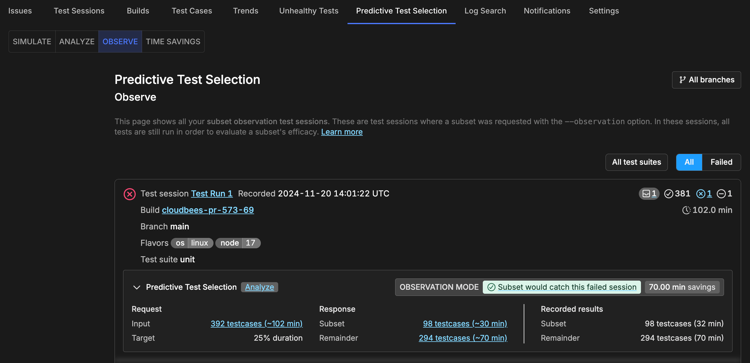
Use this data to compare your real-world results with your Confidence curve. For more information, refer to Choose a subset optimization target.