Integrate single CloudBees CI or Jenkins® controllers with CloudBees Unify to visualize CI jobs and builds, analyze test results and artifacts, and orchestrate software releases. This method connects one controller at a time to CloudBees Unify, and is ideal for Jenkins users, environments with few controllers, or selective integration.
|
Set up the integration
Follow these steps to integrate your controller with CloudBees Unify.
| Step | Where | Action |
|---|---|---|
1 |
Your controller |
Set up a CloudBees CI or Jenkins Multibranch Pipeline or an Organization Folder with a GitHub, Bitbucket, or GitLab branch source. |
2 |
Your controller |
|
3 |
CloudBees Unify |
|
4 |
Your controller |
(Optional) Manually sync your controller configuration data with CloudBees Unify. |
5 |
Your controller |
|
6 |
CloudBees Unify |
Create an SCM integration for the Multibranch or Organization Folder code source. |
7 |
CloudBees Unify |
Create a component with the integrated source code. |
System specifications
This CloudBees Unify feature has the following technical requirements and limitations. These factors may evolve.
-
Use a CloudBees CI or Jenkins Multibranch Pipeline or Organization Folder, as other project types are not supported.
-
Use a GitHub, Bitbucket, or GitLab branch source for the Multibranch Pipeline or Organization Folder. Other SCM providers are not supported at this time.
-
Create an SCM integration between the SCM repository associated with your Multibranch Pipeline or Organization Folder and CloudBees Unify.
-
If your Multibranch or Organization Folder contains more than one repository, only the first detected SCM repository is considered by CloudBees Unify.
-
Only CI jobs and builds executed from your controller after integrating with CloudBees Unify are displayed.
Set up a CloudBees CI or Jenkins Multibranch Pipeline or an Organization Folder
Set up a CloudBees CI or Jenkins Multibranch Pipeline or an Organization Folder on your controller with a GitHub, Bitbucket, or GitLab branch source. Refer to Create Multibranch Projects and Organization Folders with large repositories for details.
| GitLab Cloud and Bitbucket Data Center are supported. |
Install the required plugin to the controller
This integration requires CloudBees Unify Integration :: Controllers plugin to connect CI controller instances to CloudBees Unify.
| This plugin is only available for CloudBees CI version 2.504.2.5 or later and Jenkins version 2.504.2 or later. |
Choose one of the following installation methods:
Install the plugin from the CloudBees CI UI
Install the plugin using the CloudBees CI plugin manager.
To install the plugin to the controller:
-
From the controller dashboard, select in the upper-right corner to navigate to the Manage Jenkins page.
-
Select .
-
In the Search available plugins field, enter
CloudBees Unify Integration :: Controllers plugin. -
Select the checkbox next to the plugin.
-
Select Install in the upper-right corner.
Install the plugin using CloudBees CI Configuration as Code
CloudBees CI Configuration as Code (CasC) allows you to automate the installation and configuration of plugins on your controller.
|
To install the plugin using CasC:
-
Update the controller
plugins.yamlfile to include the CloudBees Unify Integration :: Controllers plugin:plugins: - id: "cloudbees-cbp-unify-integration" -
Apply the CasC bundles to your controller. For more information, refer to Update a CasC bundle.
Set up the controller integration in CloudBees Unify
After installing the plugin, set up a single controller integration in CloudBees Unify.
| If your deployment uses a custom CloudBees Unify endpoint, you can configure it directly from the CloudBees CI UI or CasC bundle. |
(Optional) Manually sync your controller configuration data with CloudBees Unify
Manually sync your existing controller configuration data to CloudBees Unify. An automatic sync occurs every 24 hours, independent of any manual sync.
To manually sync your controller data:
-
From the controller dashboard, select in the upper-right corner to navigate to the Manage Jenkins page.
-
Select CloudBees Unify to navigate to the CloudBees Unify configuration page.
-
On the CloudBees Unify Connection tab, under CloudBees Unify Data Synchronization, select Start sync or Resync Now.
The Sync controller configuration data status updates to:
-
Sync in progress: The synchronization is currently in progress.
-
Synced: The sync completed successfully. Once synced, a confirmation message and the sync timestamp are displayed.
-
(Optional) Monitor job configuration reconciliation
Job configuration reconciliation maps every Multibranch Pipeline job on the controller to a CloudBees Unify workflow, and every job’s repository to a CloudBees Unify component.
To view job configuration reconciliation results:
-
From the controller dashboard, select in the upper-right corner to navigate to the Manage Jenkins page.
-
Select CloudBees Unify.
-
Select the Last Job Reconciliation tab.
-
If the controller integration is not configured, you must first complete the controller integration setup in CloudBees Unify.
-
If no reconciliation has been performed yet, select Start sync on the CloudBees Unify Connection tab to trigger reconciliation.
-
When reconciliation has been performed, the reconciliation details (timestamp, triggered by, request ID, total jobs sent, and response status) and the jobs sent to CloudBees Unify with their associated SCM repositories are displayed.
-
Create an SCM integration
After your controller is integrated with CloudBees Unify, create an SCM integration for the Multibranch Pipeline or Organization Folder code source.
Create an integrated component
To fully integrate a CI pipeline with CloudBees Unify, create a component to link the source code in your controllers with CloudBees Unify. Each component connects to a single source code repository via an SCM integration. By creating a component for your pipeline source code, you can facilitate the management of complex CI pipelines and ensure traceability and insight into your SDLC. Components ensure that all code updates are systematically processed, logged, and integrated, enhancing the scalability and reliability of software delivery.
-
Create an SCM integration with CloudBees Unify for the Multibranch or Organization Folder project code source on your controllers.
-
Create a CloudBees Unify component with the integrated source code to enable metrics for your project.
-
 indicates a repository integrated with a Multibranch Pipeline that you can select to create a component.
 -
If you do not find your repository listed with
, select Set up your controller to confirm that it is connected to the CI controller.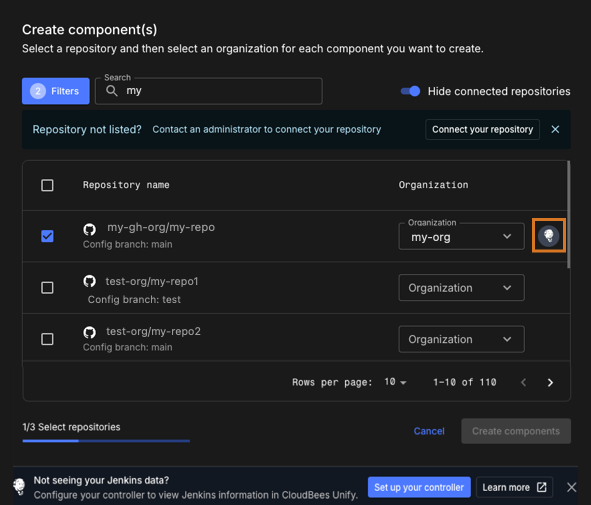 Figure 1. An integrated repository is highlighted
The component for your integrated CI pipeline is created accordingly.
-
Next steps
After you integrate your CI with CloudBees Unify, you can:
-
Visualize details of your CI jobs and builds, including test results, build artifacts, and deployed artifacts.
-
Set up automatically triggered implicit security analysis.
-
Create an application, which enables you to orchestrate complex software releases.
-
Monitor your integrated CI data in CloudBees Unify value stream management (VSM) dashboards.
-
Monitor CloudBees CI and Jenkins operations health through the CI insights for Jenkins dashboard.