Create an Amazon Web Services (AWS) Elastic Container Registry (ECR) integration to connect CloudBees Unify to AWS cloud repositories. If you manage code repositories that are behind a firewall, you can also integrate AWS repositories with CloudBees Unify. Connect to AWS with access tokens configured according to OpenID Connect (OIDC).
Once you connect your source code to CloudBees Unify, you can create a new component and set up a workflow. For more information, refer to:
Prerequisites
To integrate with AWS ECR, you must first establish an identity trust relationship between AWS and CloudBees Unify using OIDC, and then create an AWS IAM role with assigned permissions. Refer to OIDC setup and usage for more information.
Create an integration
Create an integration between CloudBees Unify and AWS ECR using OIDC.
To integrate with AWS ECR:
-
Navigate to .
-
Select Create integration. The list of available integrations displays.
-
Select Amazon ECR from the list of available integration types.
-
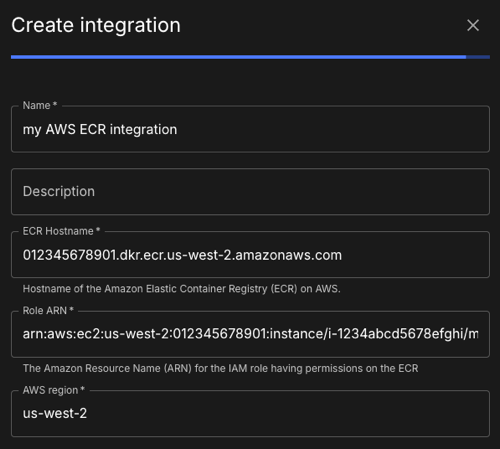
Enter an integration Name (no spaces are allowed).
-
(optional) Enter a Description.
-
Enter the ECR Hostname in the format:
<AWS_ACCOUNT_ID>.dkr.ecr.<REGION>.amazonaws.com(1)(2)1 <AWS_ACCOUNT_ID>is your AWS account ID.2 <REGION>is the AWS region you are using. -
Enter the Role ARN that uniquely identifies your AWS IAM role, in the format:
arn:aws:iam::<AWS_ACCOUNT_ID>:role/<ROLE_NAME>(1)(2)1 <AWS_ACCOUNT_ID>is your AWS account ID.2 <ROLE_NAME>is the role name you are assuming. -
Enter the AWS region you are using.
-
Select Submit.
Your AWS ECR account is connected to CloudBees Unify, and the integration is listed under Integrations.