Configuration as code (CasC) in CloudBees Unify Feature management is a GitOps strategy that bridges feature management entities in the UI with YAML files stored in SCM. This connection allows you to modify and store flag configurations using your preferred interface, ensuring changes are synchronized and seamlessly delivered to end users via the flag service layer.
What is configuration as code?
CasC enables bidirectional synchronization between your source code repository and the CloudBees Unify UI. Changes made in either location automatically sync with the other within the same organization. For example, if you update a target group in a new environment and merge your changes to the default environment, CloudBees Unify UI reflects the updates. Similarly, if you delete a flag in the UI, CloudBees Unify pushes a commit with the corresponding code change to your repository.
CasC configurations are scoped to the application in which they are defined. Configurations are not shared across applications.
Benefits of CasC
CasC enables you to:
-
Simplify deployment using pull requests for testing and release.
-
Use version control to track and roll back changes.
-
Integrate feature delivery into deployment and release pipelines by adding tools like automated testing to update flags based on production data.
-
Move or copy definitions between environments by transferring files between directories.
How CasC works
Once you integrate Feature management with your source code repository, CasC is activated. The integration is bidirectional within the same organization, meaning changes flow both ways between your SCM and the CloudBees Unify UI.
CasC processes files according to a specific folder structure, validating YAML files located in designated subdirectories and creating the corresponding entities in the system. These entities then appear in the UI for easy management.
Folder structure overview
The folder structure is organized to support consistent management across environments. At the top level, the main folder acts as the root directory. Inside this root, the .cloudbees/casc folder contains subfolders dedicated to various aspects of feature flag configuration.
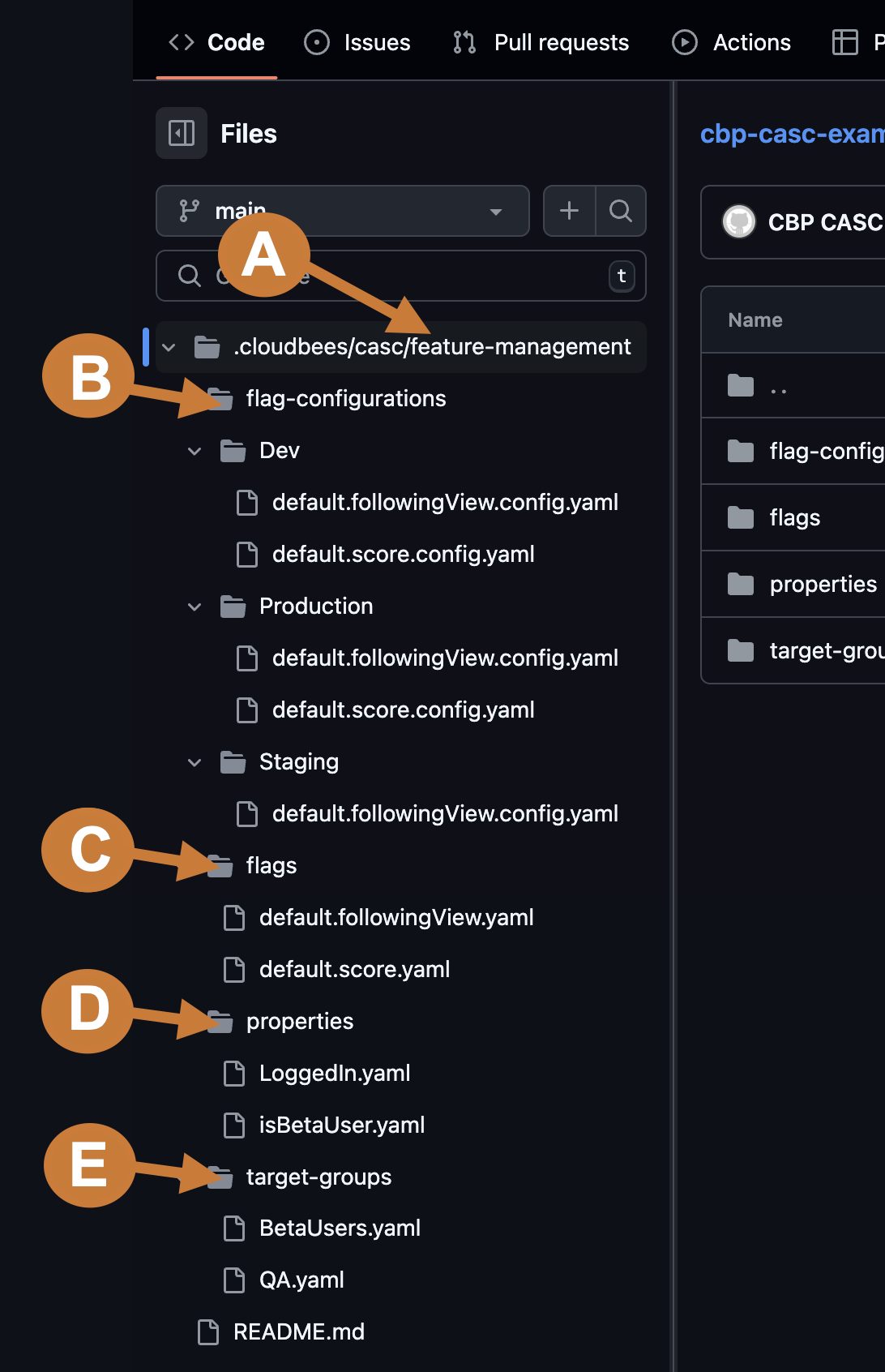
The main folders include:
-
feature-management: Contains all flags and configuration-related details
-
flags: Contains details that are consistent across environments, such as names, descriptions, labels, and variations
-
flag-configurations: Contains a subfolder for each environment with the defined flag configurations
-
properties: Contains a list of available properties for use in flag configurations or target group definitions
-
target-groups: Contains definitions for target groups, which are consistent across environments
| While the YAML files include a type field, this field has no functional impact and is intended for informational purposes only. |
For detailed information about each folder and their contents, refer to Configuration as code reference.
Next steps
-
Set up configuration as code - Learn how to connect your GitHub repository and activate CasC
-
Configuration as code reference - Review technical specifications and schemas
-
Configuration-as-Code examples - Explore practical YAML examples