This reference provides technical specifications for Configuration-as-Code (CasC) in CloudBees Unify Feature management, including folder structure details, configuration schemas, and supported parameters.
Folder structure
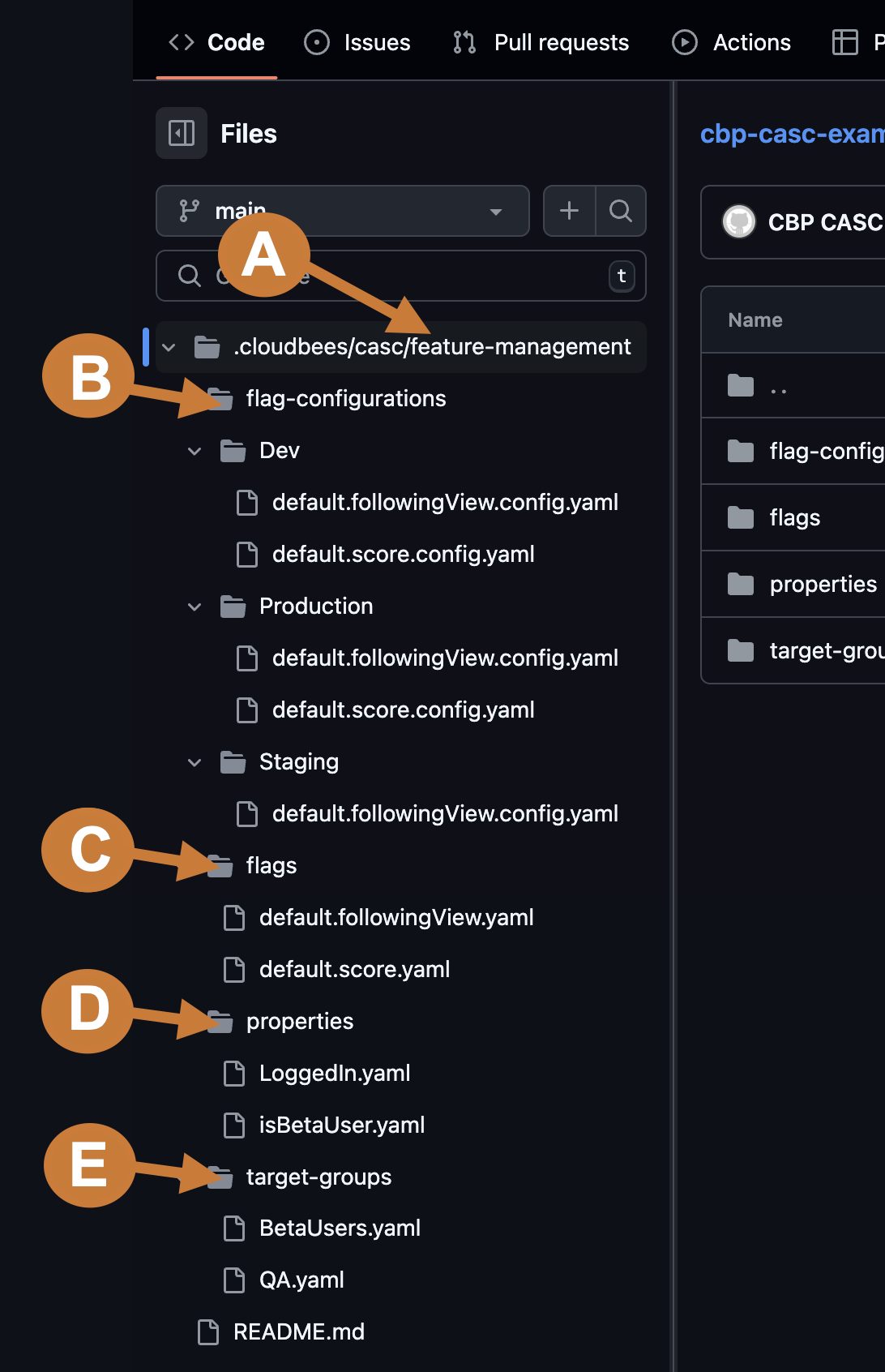
The folder structure is organized to support consistent management across environments. At the top level, the main folder acts as the root directory. Inside this root, the .cloudbees/casc folder contains subfolders dedicated to various aspects of feature flag configuration. The system processes files according to this structure, validating YAML files located in the .cloudbees/casc/feature-management/flags subdirectory and creating them as flags in the system. These flags then appear in the UI for easy management.
While the YAML files include a type field, this field has no functional impact and is intended for informational purposes only.
|
View more about each of the main folders:
A. feature-management
| Folder name and description |
|---|
feature-management: Contains all flags and configuration-related details. |
B. flag-configurations
| Folder name and description | Example content |
|---|---|
feature-management/flag-configurations: Contains a subfolder for each environment, containing the details of the defined flag configurations. |
Produces environment sub-folders. For example:
Example file name:
|
Deleting an environment in the UI will delete the corresponding environment folder under feature-management and all files within it. However, deleting an environment folder directly in an SCM only deletes the flag configurations associated with that environment, and does not delete the environment itself.
|
C. flags
| Folder name and description | Example content |
|---|---|
feature-management/flags: Contains details that are consistent across environments, such as names, descriptions, labels, variations. |
Example file name:
|
D. properties
| Folder name and description | Example content |
|---|---|
feature-management/properties: Contains a list of the available properties that can be used in flag configurations or target group definitions. |
Example file name:
|
E. target-groups
| Folder name and description | Example content |
|---|---|
feature-management/target-groups: Contains definitions for target groups, which are consistent across environments. |
Example file name:
|
inheritance.yaml [Deprecated]
| Folder name and description |
|---|
inheritance.yaml: [Deprecated] This file was previously used to reference inherited entities from parent organizations. Inheritance is no longer needed - feature management entities are now independently scoped to the organization in which they are created. |
Root configuration schema
The flag value is controlled at runtime for all CasC flags.
Select the link below to show the inputs for the base, or root, schema for CasC in CloudBees Unify Feature management.
View details about the root input schema:
| Input name | Data type | Required? | Description |
|---|---|---|---|
|
Semver |
No |
The CloudBees Unify API version.
The default value is |
|
String |
Yes |
For a flag, must specify |
|
String |
Yes |
The name of the flag controlled by this flags definition. |
|
String |
No |
The flag name. |
|
String |
No |
The flag description. |
|
String, Boolean |
No |
The available values for the flag. |
|
Boolean |
No |
Whether the flags status is enabled. |
|
String |
No |
The flag labels. |
|
String |
No |
The stickiness property that controls percentage-based flag evaluation.
The default value is |
|
String |
No |
The code language or framework name. For example, |
|
Array |
No |
An array of conditions having a logical |
|
String |
No |
The value when no condition is met.
The default value is |
Conditional configuration
A condition is an if/else statement.
An array of conditions is processed in order, with a logic gate between each condition statement. There are the following four types of condition statements: dependency, group, property, and version.
View details about the four types of condition statements:
-
dependency: Expresses flag dependencies by indicating a flag name and expected value.Table 2. Dependency nested inputs Input
nameData type Required for a dependency? Description flagString
Yes
The flag name.
valueString Boolean
Yes
The expected flag value.
-
group: Lists target groups and the operator that indicates the relationship between them.Table 3. Target group nested inputs Input
nameData
typeRequired for a target group? Description nameArray / String
Yes
The list of target group names.
operatorLogical operator
Yes
The type of relationship between groups:
and|or|not. -
property: A single property that includes an operator and an operand; multiple conditions are possible.Table 4. Single property nested inputs Input name Data
typeRequired for a property? Description nameString
Yes
The custom property name.
operatorLogical
comparison operatorNo
The first operand of the condition; accepts
is-undefined|is-true|is-false|in-array|eq|ne|gte|gt|lt|lte|regex|semver-ne|semver-eq|semver-gte|semver-gt|semver-lt|semver-lteoperators.operandString
NumberRequired only if
operatorspecifiesis-undefined|is-true|is-false.The second operand of the condition.
-
version: Compares the version value of one to another.Table 5. Version nested inputs Input
nameData
typeRequired for a property? Description semverSemver
Yes
The version to compare to.
operatorLogical
comparison operatorNo
The operator to compare to the
semverversion; acceptssemver-eq|semver-ne|semver-gte|semver-gt|semver-lt|semver-lteoperators.
Specify the value when the condition is met with the value input.
Multiple conditions
Create multiple conditions using and|or logical operators between any of the above types of condition statements.
Specify the operator in acrossTypesLogicGate.
For example, if a dependency is met and a user matches a target group, then a Boolean flag serves true. Otherwise, the flag is false (default).
Split release schema
Specify a percentage of web traffic to split across different flag values.
| Input name | Data type | Required? | Description |
|---|---|---|---|
|
Number |
Yes |
The percentage for which the flag value is true. |
|
Boolean|String|Number |
Yes |
The flag value delivered to the |
Scheduled value schema
Enable/disable a feature for a percentage of app users at a specified date and time.
The flag value is either true or false.
| Input name | Data type | Required? | Description |
|---|---|---|---|
|
Date |
Yes |
The date and time when the flag value is switched to the specified |
|
Number |
Yes |
The percentage of users served the flag |
|
Boolean |
Yes |
The flag value delivered to the |
Related topics
-
Set up configuration as code - Learn how to set up CasC
-
Configuration-as-Code examples - Explore practical YAML examples
-
Get started with configuration as code - Understand CasC concepts