Use this action to scan repositories for dependency vulnerabilities with the Black Duck Software Composition Analysis (SCA) scanner, and then view comprehensive security results in CloudBees Unify. Also use the action output as a quality gate for the next step or job in your workflow.
This action is available on the GitHub marketplace.
For background on how the scanner works and the difference between explicit and implicit scans, refer to Understanding Black Duck scanning.
Prerequisites
Set up CloudBees Unify and GHA to work together, providing key features of CloudBees Unify to GHA workflows. For more information, refer to Set up GitHub Actions integration.
Inputs
| Input name | Data type | Required? | Description |
|---|---|---|---|
|
String |
Yes |
The Black Duck client secret. |
|
String |
Yes |
The Black Duck server URL. |
|
String |
No |
The CloudBees Unify URL.
The default value is |
|
String |
No |
Specify any Black Duck Detect properties. |
|
String |
No |
The Black Duck project name. |
|
String |
No |
The Black Duck project version. |
Outputs
| Output name | Data type | Description |
|---|---|---|
|
String |
The number of Critical security findings discovered during the scan. |
|
String |
The number of Very high security findings discovered during the scan. |
|
String |
The number of High security findings discovered during the scan. |
|
String |
The number of Medium security findings discovered during the scan. |
|
String |
The number of Low security findings discovered during the scan. |
This action uses GitHub OIDC authentication to securely communicate with CloudBees Unify. Be sure to set permissions to id-token: write in your workflow.
|
Usage examples
The following is a basic example of using this action:
permissions: id-token: write contents: read steps: - name: Scan with Black Duck SCA uses: cloudbees-io-gha/blackduck-scan-publish@v2 with: api-token: ${{ secrets.BLACK_DUCK_TOKEN }} server-url: ${{ vars.BLACK_DUCK_URL }}
In the following example, the Black Duck Detect properties
logging.level.detect and blackduck.offline.mode are specified:
Using the action output
You can use the output values from this action in downstream steps and jobs. The following example uses the action output in a downstream step of the same job:
The following example uses the action output in a downstream job:
Full workflow and run example
The following GHA workflow example scans a repository with Black Duck.
Example GHA workflow YAML file
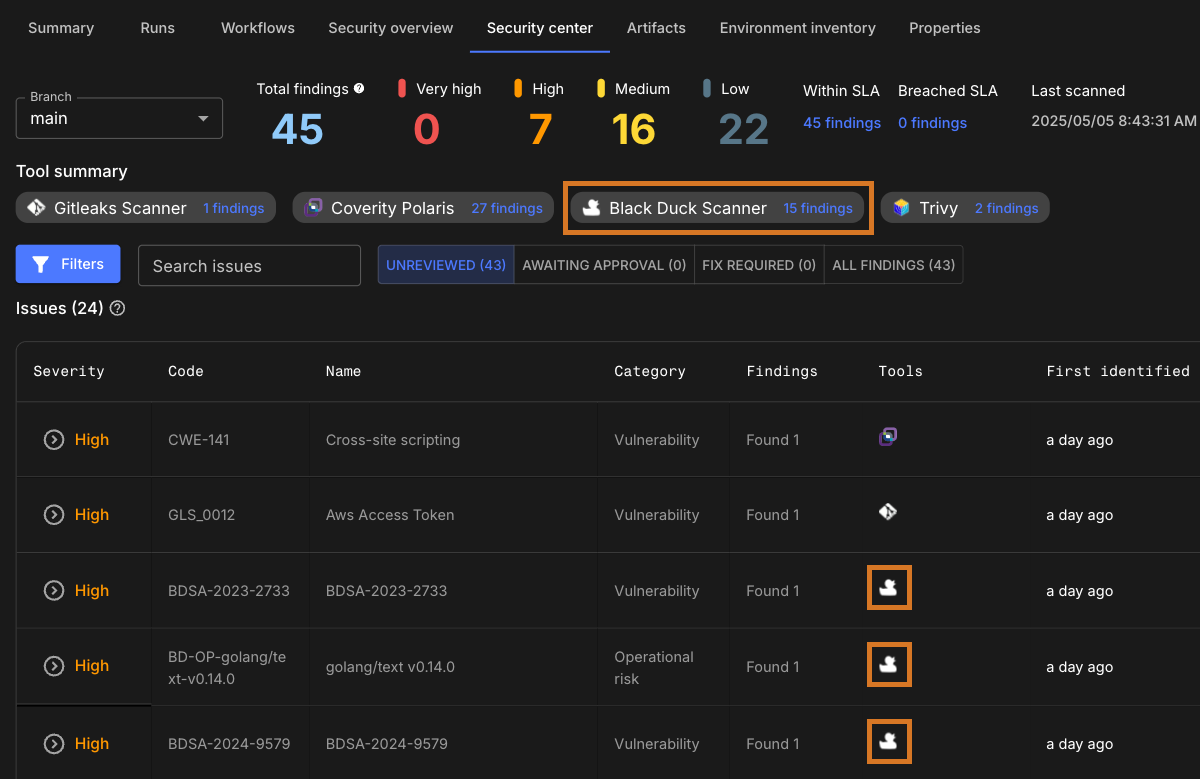
After the GHA run has completed, the security findings are collected and displayed in the Component security center of the component containing the workflow.
Scan a CloudBees Unify workflow explicitly with Black Duck
If you are using a CloudBees Unify workflow rather than a GHA workflow, explicitly scan with the CloudBees Black Duck action.