Package, push, install, and uninstall Helm charts in your CloudBees Unify workflows using CloudBees Helm actions.
| Pushing a Helm chart requires OCI registry credentials to be configured before the push step. Refer to Configure container registry credentials. |
Package a Helm chart
Use the cloudbees-io/helm-package action to package a Helm chart directory into a versioned TGZ archive file.
| All CloudBees action repositories are listed at CloudBees, Inc. on GitHub. |
Inputs
| Input name | Data type | Required? | Description |
|---|---|---|---|
|
String |
Yes |
The path of the Helm chart to be packaged. |
|
String |
Yes |
The path of the packaged Helm chart. |
|
String |
Yes |
The Helm release version. |
|
String |
Yes |
The application version. |
|
Boolean |
No |
Default is |
|
Boolean |
No |
Default is |
|
String |
No |
The signing key. |
Push a Helm chart
Use the cloudbees-io/helm-push action to publish a packaged Helm chart to an OCI registry.
The action also registers the chart as a trackable artifact in CloudBees Unify.
| All CloudBees action repositories are listed at CloudBees, Inc. on GitHub. |
Automatic artifact data reporting
This action reports artifact-related data to the workflow run for artifact traceability purposes.
Do not include the Register and track artifacts action for the same artifact version, as the resulting run would register duplicate artifact entries to CloudBees Unify.
Inputs
| Input name | Data type | Required? | Description |
|---|---|---|---|
|
String |
No |
The name of the artifact, used when registering the build artifact in CloudBees Unify. If not provided, the artifact name defaults to the name of the chart. |
|
String |
Yes |
The path of the Helm chart package to be published. |
|
String |
No |
The commit ID from the source repository, used when registering the build artifact in CloudBees Unify.
Default is |
|
String |
No |
The component ID associated with the artifact.
If not provided, the artifact is registered with the component of the current workflow run.
Default is |
|
String |
No |
The ref or branch of the source repository, used when registering the build artifact in CloudBees Unify.
Default is |
|
String |
Yes |
The URL of the published Helm chart package. |
|
String |
No |
The clone URL of the source repository, used when registering the build artifact in CloudBees Unify.
Default is |
Outputs
| Output name | Data type | Description |
|---|---|---|
|
String |
The unique identifier of the artifact reported to CloudBees Unify. |
|
String |
The image reference pointing to the chart upload location. |
|
String |
The version of the uploaded Helm chart package. |
Usage examples
The following examples show a basic push and a full workflow that packages, configures registry credentials, pushes, and verifies the output.
Basic example
- name: Push Helm chart uses: https://github.com/cloudbees-io/helm-push@v1 with: chart: ./charts/example remote: oci://registry.example.com/example
Full workflow example
The following workflow packages and publishes a Helm chart to an AWS ECR registry, which is compatible with Open Container Initiative (OCI) standards, then verifies the output.
Example workflow YAML file
apiVersion: automation.cloudbees.io/v1alpha1 kind: workflow name: test on: push: branches: - '**' jobs: test: permissions: scm-token-own: read id-token: write steps: - name: Get source code uses: cloudbees-io/checkout@v1 with: repository: my-name/my-repo-name - name: Package the Helm chart id: package uses: cloudbees-io/helm-package@v1 with: chart: my-name/my-repo-name/charts/example destination: ./chart-output - name: Login to AWS uses: https://github.com/cloudbees-io/configure-aws-credentials@v1 with: aws-region: us-east-1 role-to-assume: ${{ vars.oidc_staging_iam_role }} role-duration-seconds: "3600" - name: Configure container registry for staging ECR id: ecrconfig uses: cloudbees-io/configure-ecr-credentials@v1 - name: Push Helm chart id: push-chart uses: cloudbees-io/helm-push@v1 with: chart: ${{ steps.package.outputs.chart }} remote: oci://123456789012.dkr.ecr.us-east-1.amazonaws.com/for-testing - name: Verify the output uses: docker://alpine/helm:3.12.1 run: | set -x [ "$CHART" = oci://123456789012.dkr.ecr.us-east-1.amazonaws.com/for-testing/example-chart ] [ "$VERSION" = 3.2.1 ] MANIFEST="$(helm template myrelease $CHART --version=$VERSION)" echo "$MANIFEST" | grep -q "my example data" echo "The artifact ID for $CHART:$VERSION is ${{ steps.push-chart.outputs.artifact-id }}" env: CHART: ${{ steps.push-chart.outputs.chart }} VERSION: ${{ steps.push-chart.outputs.version }}
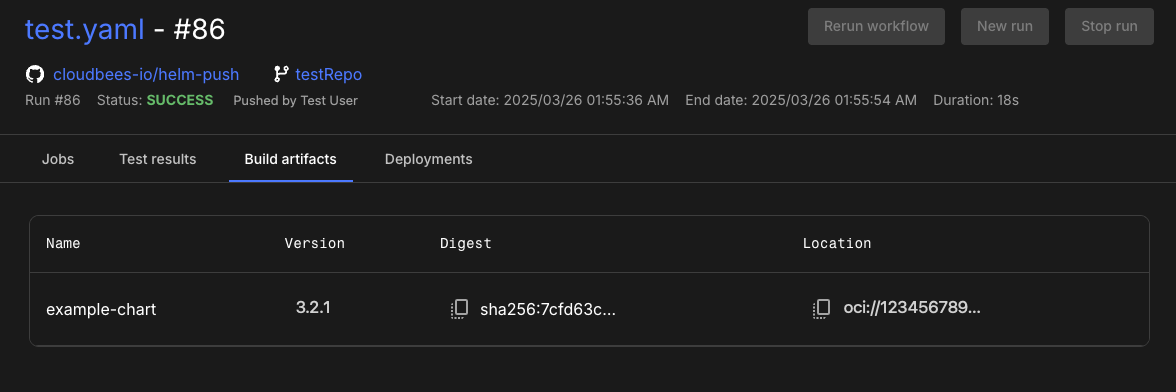
After the run completes, the artifact version and chart reference output display in both and in CloudBees Unify.
Install a Helm chart
Use the cloudbees-io/helm-install action to install a Helm chart into a Kubernetes cluster.
| This action does not support using Helm charts from traditional Helm repositories, because it does not expose a repository input. |
| All CloudBees action repositories are listed at CloudBees, Inc. on GitHub. |
Inputs
| Input name | Data type | Required? | Description |
|---|---|---|---|
|
String |
Yes |
The Helm release name. |
|
String |
Yes |
The Helm chart location, which is one of the following:
|
Uninstall a Helm chart
Use the cloudbees-io/helm-uninstall action to remove a Helm chart release from a Kubernetes cluster.
| All CloudBees action repositories are listed at CloudBees, Inc. on GitHub. |