In this tutorial we will complete our CI/CD pipeline by adding container image building and publishing to Docker Hub, creating end-to-end automation from code commit to deployed artifacts. Along the way we will encounter secure credential management, container registry integration, and complete CI/CD workflow automation.
By the end, you will have a complete CI/CD pipeline that automatically builds, tests, scans, and publishes containerized applications to a registry.
Before we begin, ensure you have:
-
Completed Add security scanning and have a working CI workflow with build, test, and scan steps
-
An existing Docker account (if you do not yet have one, sign up for free)
Set up Docker Hub prerequisites
First we need to prepare Docker Hub for automated container publishing by creating a repository and secure access credentials.
-
Create a new empty repository in Docker Hub, named
my-sample-go-app. To learn more, refer to the Docker Hub documentation. -
Create a Docker personal access token.
| CloudBees strongly recommends that you create and use a Docker personal access token instead of a password to maintain security and protect your account. |
Your Docker Hub account is now ready with a repository for publishing and secure credentials for automation access.
Configure secure Docker credentials
Now we’ll store your Docker credentials securely in CloudBees Unify as properties, making them available to workflows while maintaining security through encryption.
To store your Docker username:
-
Select .
-
Select Create property.
-
Enter
QUICKSTART_DOCKER_USERNAMEas the Property name. -
Select String from the Data type options.
-
Enter your Docker username as the Value.
-
Select Save.
Your Docker username is stored unencrypted and is available for use in CloudBees Unify workflows.
To store your Docker access token:
-
Select .
-
Select Create property.
-
Enter
QUICKSTART_DOCKER_TOKENas the Property name. -
Select String from the Data type options.
-
Enter your Docker token as the Value.
-
Select Secret.
-
Select Save.
Your Docker personal access token is stored encrypted for security, and is available for use in CloudBees Unify workflows. The distinction between public properties and encrypted secrets ensures sensitive credentials remain protected while allowing workflows to access them securely.
Add container publishing to your workflow
Now we’ll extend our existing workflow with Docker registry configuration and container publishing steps, completing our CI/CD pipeline automation.
Configure Docker Hub registry access
First, add a step that signs into Docker Hub using the secure credentials we configured. This step uses the CloudBees Configure OCI credentials action to create authorization from your Docker username and token.
-
Select Components, and then select a component from the list.
-
Select Edit YAML on your workflow.
-
Enter the following in the code editor, starting just after your SonarQube scan step:
- name: Set up Docker Hub registry uses: https://github.com/cloudbees-io/configure-oci-credentials@v1 with: registry: index.docker.io username: ${{ vars.QUICKSTART_DOCKER_USERNAME }} password: ${{ secrets.QUICKSTART_DOCKER_TOKEN }}
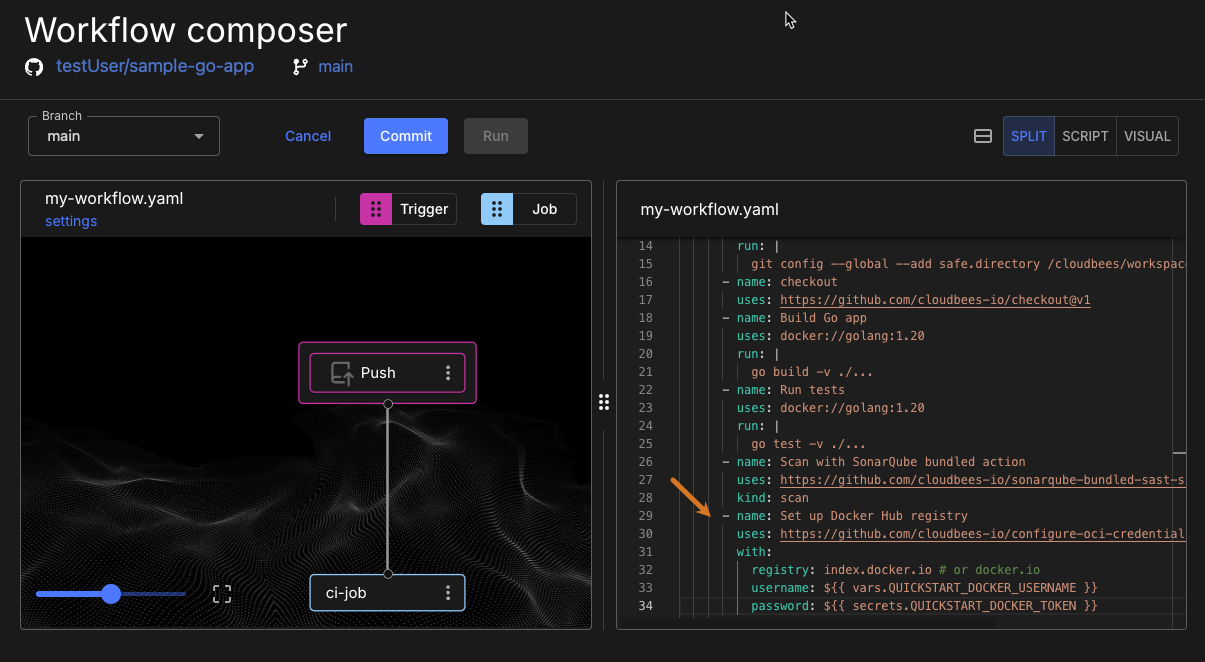
The registry configuration step securely authenticates with Docker Hub using the credentials stored in CloudBees Unify properties.
Add container image publishing
Now we’ll add the final step that builds and publishes our container image using Kaniko, a tool for building container images from a Dockerfile. The CloudBees Kaniko action enables container building and publishing in a single workflow step.
-
Enter the following in the code editor, starting just after your
Set up Docker Hub registrystep:- name: Push image to registry uses: https://github.com/cloudbees-io/kaniko@v1 with: destination: ${{ vars.QUICKSTART_DOCKER_USERNAME }}/my-sample-go-app:1.0.0
The destination key uses the format <Docker username>/<Docker repository name>:<Tag label>, referencing your Docker username from properties and applying the tag label 1.0.0.
|
Your workflow now includes complete CI/CD automation: build, test, security scan, and container publishing.
| Check to confirm that your workflow includes all steps in sequence: git configuration, checkout, build, test, scan, registry setup, and image publishing. |
Run your complete CI/CD pipeline
Let’s commit our enhanced workflow and observe the complete automation pipeline from code to published container.
-
Select Commit.
-
Enter a Commit message.
-
Select Commit to current branch.
-
Select Finish.
The complete pipeline runs automatically after the commit, executing all phases including container building and publishing. This process may take several minutes as it performs build, test, scan, and container publishing operations.
-
Select your component, and then select Runs from the left pane.
-
Select Display run to the right of your run.
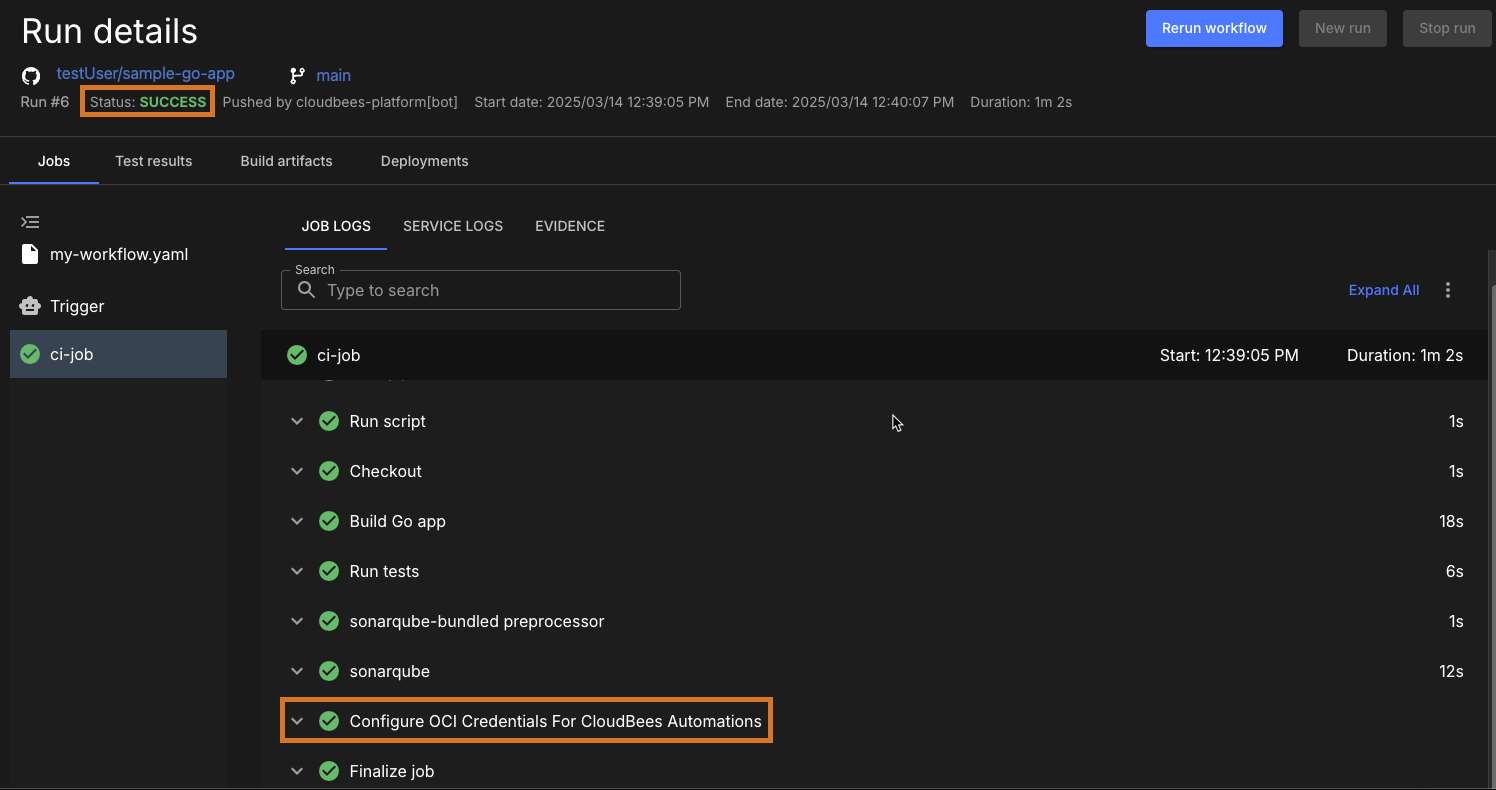
The workflow run shows successful execution of all automation phases, including secure Docker authentication and container publishing. Each step provides detailed logging to verify successful completion and troubleshoot any issues.
Verify published container image
Now let’s confirm that our container image was successfully published to Docker Hub with proper tagging and metadata.
-
Navigate to your Docker Hub account and repository.
-
Verify that the
my-sample-go-apprepository contains the published image with tag1.0.0.
The published container image appears in Docker Hub with automated tagging from the workflow context, demonstrating successful end-to-end CI/CD automation. The image is immediately available for deployment, distribution, or further automation workflows.
Your complete CI/CD pipeline now automatically transforms code commits into tested, scanned, and published container artifacts without manual intervention.
What we accomplished
We have successfully completed a full CI/CD pipeline that automatically builds, tests, scans, and publishes containerized applications to Docker Hub. Along the way we encountered secure credential management, container registry integration, and end-to-end automation workflows.
You now have a complete CI/CD pipeline that transforms code changes into deployed artifacts automatically, demonstrating modern DevSecOps practices with integrated security and streamlined delivery.
From here, you can:
-
Explore advanced deployment workflows and orchestration platform integration.
-
Customize container tagging strategies and image lifecycle management.
-
Integrate additional testing phases or deployment targets into your automation pipeline.