Generate and manage personal access tokens (PATs) to authenticate with the CloudBees Unify API. PATs are general-purpose API credentials that allow tools, scripts, and integrations to call CloudBees Unify APIs without exposing your account credentials.
| Personal access tokens function like passwords. Store them securely and never hardcode them in source code or configuration files. |
Generate a personal access token
-
Select your account name, then select User profile.
-
Select the Personal access tokens tab.
-
Select Generate token.
-
Enter a token Name. Use a descriptive name that identifies the token’s purpose or the tool that will use it.
-
(Optional) Enter a Description to add context about the token’s intended use or associated project.
-
Enter a Duration:
-
Keep the default of 7 days for short-term or testing use.
-
Select 30, 60, or 90 days for extended access.
-
Select Custom, then select a date from the calendar.
-
-
Select Generate to create the token.
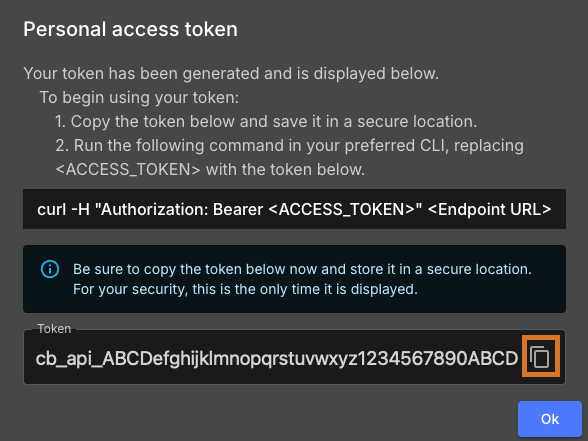
-
Select
 to copy the token and store it in a secure location.
| The token value is only displayed once. Store it immediately — it cannot be retrieved after you leave this screen. |
Delete a personal access token
Remove tokens that are no longer needed or may have been compromised.
-
Select your account name, then select User profile.
-
Select the Personal access tokens tab.
-
Select
 next to the token you want to delete.
 -
Select Delete.
-
Select Delete to confirm.
| Token deletion is permanent and irreversible. Any tools or scripts using the deleted token immediately lose access. |