Define service-level agreements (SLAs) for security vulnerability remediation to establish acceptable response timeframes based on finding severity. Security SLAs provide organizational governance for vulnerability management, ensuring consistent remediation expectations across development teams while supporting compliance and risk management requirements.
Security SLA configuration determines how quickly security findings must be addressed based on their severity ratings, with higher severity issues requiring faster response times to maintain acceptable security posture.
For conceptual information about SLA management in application security, refer to Understanding application security posture management.
| You need either the Admin role or a custom role with the Configure SLA permission to define security SLAs. |
Understand default SLA values
CloudBees Unify provides default SLA response timeframes that establish baseline expectations for vulnerability remediation based on industry best practices.
Default SLA response windows (in days):
-
Critical severity: 15 days
-
High severity: 35 days
-
Medium severity: 180 days
-
Low severity: 360 days
These default values balance security urgency with development practicality, allowing organizations to maintain reasonable remediation expectations while ensuring critical vulnerabilities receive prompt attention.
| To define the SLA, you must either have the Admin role, or a custom role with the Configure SLA permission. |
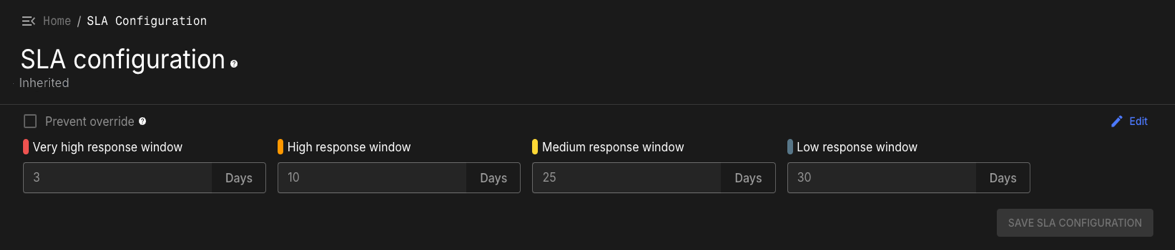
Child organizations automatically inherit SLA configurations from their parent organization unless explicitly overridden, enabling centralized security governance with local flexibility where needed.
Configure organization SLA
Define SLA response timeframes at the organization level to establish vulnerability remediation expectations for all child organizations and components.
To configure SLA for the root organization:
-
Select the organization from the organization selector.
-
Select .
-
Select Edit from the upper-right corner.
-
For each severity level, enter the acceptable response window in days:
-
Critical: Severe vulnerabilities requiring immediate attention
-
High: Serious vulnerabilities requiring prompt remediation
-
Medium: Moderate vulnerabilities requiring timely resolution
-
Low: Minor vulnerabilities requiring eventual resolution
-
-
(Optional) Select Prevent override to prevent child organizations from modifying these SLA settings.
-
Select Save SLA configuration.
The updated SLA configuration applies to all security findings within the organization hierarchy, providing consistent remediation expectations across development teams.
Manage SLA inheritance
Control how SLA configurations cascade through organizational hierarchies to balance centralized governance with local operational requirements.
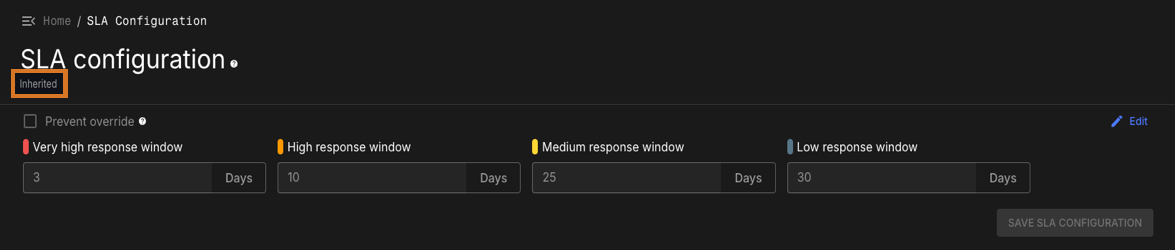
The Configuration status indicator shows how an organization’s SLA configuration relates to its parent:
-
Default: Organization uses unchanged default SLA configuration
-
Original: SLA configuration set directly in the organization rather than inherited from a parent, typically in the tenant organization when an admin changes the default values
-
Inherited: Organization inherits SLA configuration from parent organization
-
Overridden: Organization has custom SLA settings different from parent
Create SLA overrides
Override inherited SLA configurations when child organizations require different vulnerability remediation timeframes due to operational constraints or business requirements.
Prerequisites for creating SLA overrides:
-
Ensure the parent organization allows overrides:
-
Navigate to the parent organization
-
Select
-
Verify Prevent override is not selected
-
If Prevent override is active, disable it to allow child organization customization
-
To create an SLA override:
-
Navigate to the child organization requiring custom SLA settings.
-
Select from the left sidebar.
-
Select Create override from the upper-right corner.
-
Configure custom response windows for each severity level based on organizational requirements.
-
(Optional) Select Prevent override to prevent further customization by subordinate organizations.
-
Select Save SLA configuration.
The child organization now uses custom SLA settings independent of parent organization changes.
Understand override behavior
SLA override interactions affect how configuration changes propagate through organizational hierarchies over time.
Override preservation:
-
Child organization SLA settings persist even when parent organizations disable and re-enable override permissions
-
Custom configurations remain stored and automatically restore when override restrictions are lifted
-
Override records prevent parent organization changes from affecting child organization SLA settings
Override restrictions:
-
When parent organizations select Prevent override, all child organizations revert to inheriting parent SLA settings
-
Existing override configurations remain stored but become inactive until restrictions are removed
-
Parent SLA changes immediately apply to all child organizations when overrides are prevented
This behavior enables flexible SLA governance that can adapt to changing organizational requirements while preserving custom configurations for future use.
Monitor SLA compliance
Track vulnerability remediation performance against defined SLA timeframes to identify compliance trends and areas requiring attention.
SLA compliance appears in security dashboards and reports:
-
Security overview dashboards display SLA breach indicators and compliance trends
-
Component security centers show SLA status for individual findings
-
Application security centers provide SLA compliance across multiple components
SLA compliance tracking helps organizations:
-
Identify development teams consistently meeting or missing remediation targets
-
Adjust SLA timeframes based on actual remediation capabilities and business requirements
-
Demonstrate security governance effectiveness for compliance and audit purposes
-
Prioritize security process improvements based on performance data
Integrate SLAs with triage workflows
Connect SLA timeframes with security finding triage processes to ensure appropriate remediation prioritization and approval workflows.
SLA integration with finding status:
-
Unreviewed findings: SLA countdown begins when security tools initially detect issues
-
Fix Required findings: SLA timeframes establish remediation deadlines for development teams
-
Risk Accepted findings: SLA due dates are replaced with risk acceptance expiry dates during the acceptance period
-
Resolved findings: SLA compliance is recorded for performance tracking and reporting
When risk acceptance expires:
-
Findings automatically revert to Unreviewed status after expiry date
-
Local SLA due dates restore based on current organizational SLA settings
-
New security scans trigger to verify continued presence of the security issue
-
Triage workflows restart to reassess risk acceptance or require remediation
For detailed triage procedures, refer to Triage security findings.