This comprehensive guide of the data security architecture for CloudBees Unify Edge Runners is written for customer security teams, network administrators, and compliance officers evaluating the solution for deployment within their infrastructure.
What are CloudBees Unify Edge Runners?
CloudBees Unify Edge Runners let you execute CI/CD jobs from CloudBees Unify on your own infrastructure while remaining fully integrated with CloudBees Unify. This allows your organization to run builds and workflows on-premises or in a private cloud without exposing internal systems to inbound connections. Edge runners are a standalone binary that you install within your own network.
Security at a glance
The following table summarizes the security features and each implementation detail.
| Security feature | Implementation |
|---|---|
Network direction |
Outbound only (port 443) |
Transport encryption |
TLS 1.2 or higher |
JWTs with RSA-based signatures (4096-bit keys) |
|
Secrets storage |
HashiCorp Vault (encrypted) |
Organization isolation |
Strict tenant separation |
Architecture
The following models for CloudBees Unify Edge Runners include:
-
Deployment: The deployment model describes how the Edge Runner is installed and configured within your network.
-
Communication: The communication model describes how the Edge Runner communicates with CloudBees Unify and other services.
-
Code execution trust: The code execution trust model describes how the Edge Runner executes jobs and manages secrets.
-
Job execution isolation: Edge runners offer two job execution modes: native and containerized.
Deployment model
The Edge runner is deployed entirely within your network. CloudBees does not deploy any agents, services, or components inside your network beyond the Edge runner binary itself, which you download and manage.
Supported deployment options include:
-
Virtual machines (Linux)
-
Bare metal servers
CloudBees does not currently support a container image for the Edge runner. The customer can build their own container image by embedding the binary, which also enables deployment in a container or a Kubernetes pod.
The customer maintains full control over the following:
-
The operating system and security configuration of the host machine.
-
The network access and firewall rules for the Edge runner.
-
Resource allocation and scaling of the Edge runner.
-
The update and patching schedule of the host machine.
Communication model
Edge runners use a long-polling architecture which the runner initiates all connections to CloudBees Unify. This design provides several security benefits, including:
-
No inbound network exposure: Your firewall only needs to allow outbound HTTPS traffic.
-
Proxy compatability: Works with corporate HTTP proxies and NAT gateways.
-
Graceful degradation: Network interruptions are handled automatically with exponential backoff and retries.
System architecture diagrams
The following diagrams illustrate the system architecture options for CloudBees Unify Edge Runners.
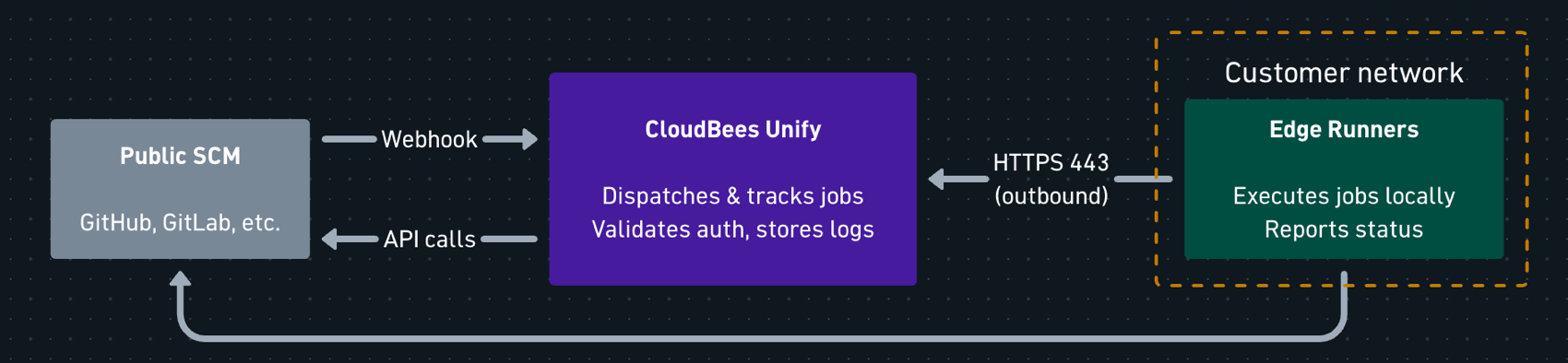
CloudBees Unify with a public SCM
The following diagram is a typical deployment with the CloudBees Unify (cloudbees.io) and a publicly accessible SCM.
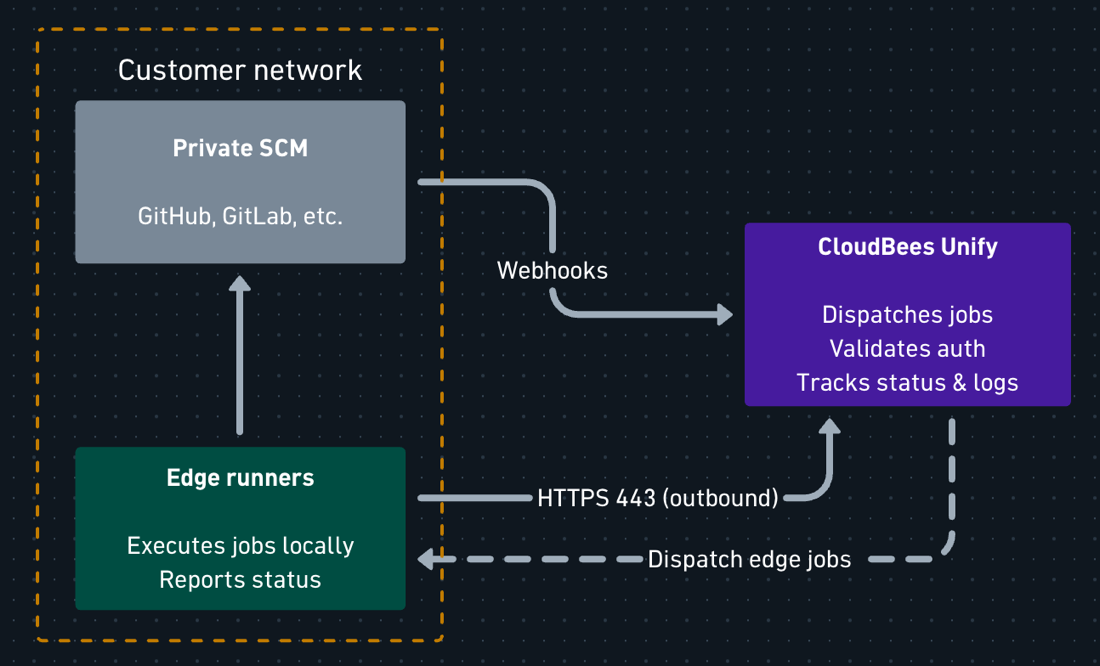
CloudBees Unify with a private SCM
The following diagram is a deployment of CloudBees Unify (cloudbees.io) connecting to a private SCM.
|
All edge runner connections are outbound from the customer network. |
Key points include:
-
All Edge runner connections originate from the customer network to CloudBees Unify (outbound only).
-
CloudBees Unify cannot initiate connections into customer infrastructure.
-
Logs are uploaded directly to AWS S3 by the runner using presigned URLs obtained from CloudBees Unify.
Code execution trust model
Edge runners execute the commands defined in the job definitions they receive from CloudBees Unify. This is an inherent characteristic of CI/CD agents: their purpose is to run commands on behalf of a central platform.
In practice this means:
-
The Edge runner executes any commands included in a job definition sent by CloudBees Unify.
-
Job definitions originate from workflows that you own users author within your CloudBees Unify organization.
-
You trust CloudBees Unify to dispatch only the legitimate jobs that correspond to your configured workflows.
You trust CloudBees Unify to dispatch only the legitimate jobs that correspond to your configured workflows and the required system operations to interact with the integrated private tools, like SCMs.
Mitigating controls:
-
Jobs are scoped to the organization that owns the runner.
-
All job dispatches are logged by CloudBees Unify and can be audited if necessary.
Customer consideration: Deploy Edge runners with appropriate isolation (dedicated VMs, containers, and limited network access to internal systems) based on your security requirements, as you would with any other CI/CD agent. For more information, refer to Edge Runners security best practices.
Job execution isolation
CloudBees Unify Edge Runners support two job execution modes: native and Docker. The available mode is selected when you configure the runner, and runners only receive jobs appropriate to their configured execution modes.
Native execution mode
In native mode, the Edge runner runs commands directly on the host operating system, with no isolation or containerization of the executed commands. The runner needs access only to its configured working directory.
Jobs executed in native mode have same access to the local environment as the user running the Edge runner. This means a job can:
-
Read or write files accessible to that user, including files outside the job’s working directory.
-
Invoke any executable available to that user.
-
Make the same network calls that the runner itself can make.
-
For workflows, read any secret used by any step in the job (any step can read any other step’s secrets).
When executing workflows in native mode, the runner dynamically downloads the CloudBees Unify workflow runtime binary and uses it to execute the job’s steps. his download occurs over a secure TLS connection, and the binary is signed by CloudBees Unify. After downloading, the runtime’s signature is verified against an RSA public key embedded in the runner binary. This runtime supports DSL features such as expressions, conditional evaluation, and secret masking.
Docker execution mode
In Docker mode, the Edge runner executes each job step in a separate Docker container. This provides isolation between jobs and the host environment. The runner must have access to a Docker-compatible container runtime via the Docker socket interface, as well as its configured working directory.
A range of hardening controls is applied:
-
Containers run with
NET_RAWdropped, retaining the rest of Docker’s default capability set to match non-Edge Runner CloudBees Unify workflow execution. -
Privilege escalation at
execveis blocked viano-new-privileges. -
The default Docker seccomp profile is applied to all containers.
-
Privileged mode is not supported.
-
Each job gets an isolated Docker network.
-
Containers are limited to 4096 PIDS.
The containers within a job share volumes that are configured by the CloudBees Unify workflow engine. Workflow authors do not control these volumes or the volume mounts. All mounts are either for ephemeral volumes or for empty directories in the runner working directory.
In Docker mode, steps are also isolated from one another, matching the standard security model for CloudBees Unify workflows that execute within CloudBees Unify infrastructure. For example, a step cannot read secrets intended for other steps.
Data flow analysis
The following section analyzes the data crosses the network boundary between your infrastructure and CloudBees Unify.
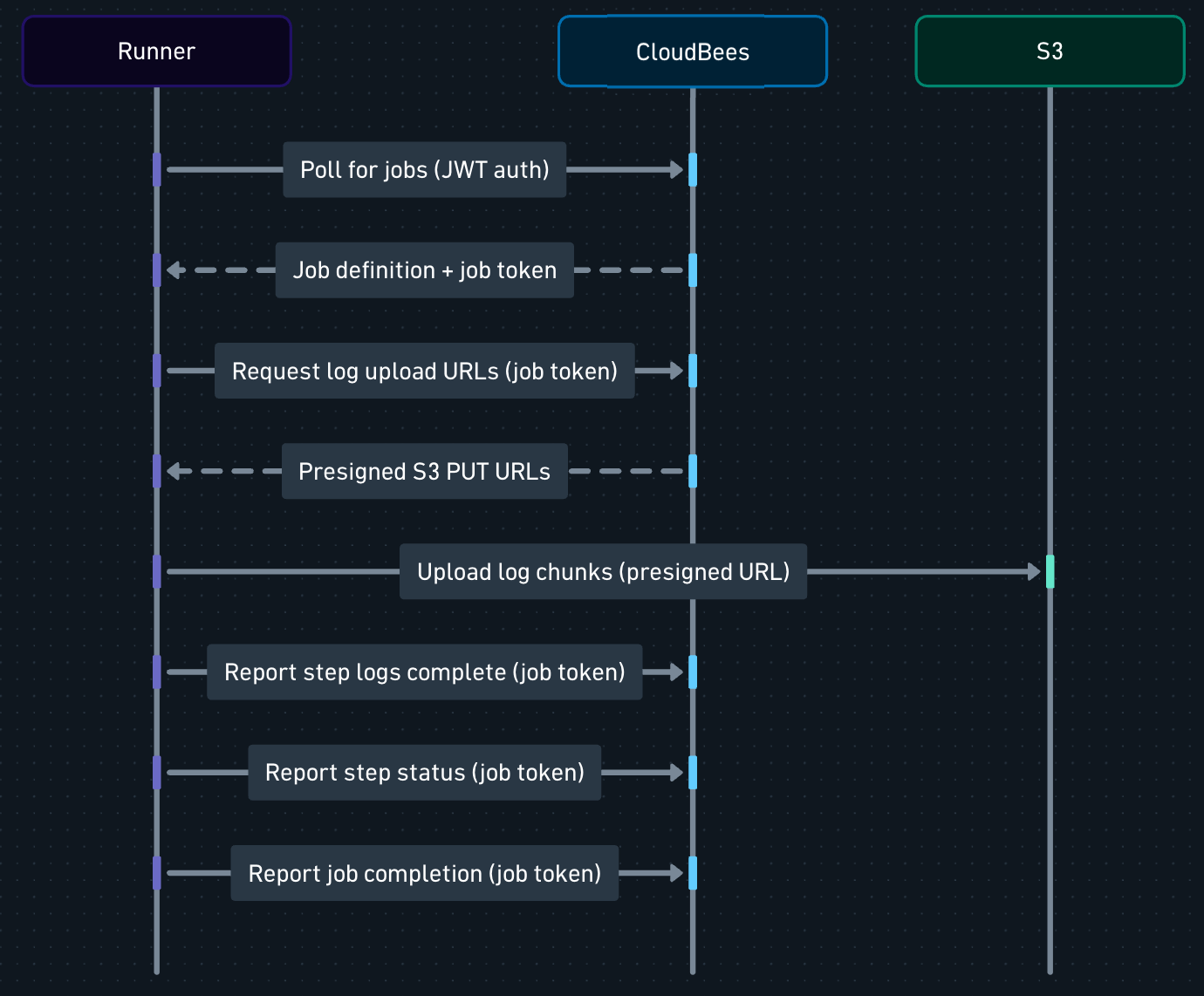
Job execution flow
The following illustrates the flow of a job execution from the time a workflow is triggered to the time the job completes. The participants are as follows:
-
CloudBees Unify as CloudBees Unify
-
Runner as Edge runner
-
S3 as AWS S3
Data transmitted from the customer network to CloudBees Unify
The following tables summarize the data transmitted from the customer network to CloudBees Unify during job execution.
Runner registration
This is a one-time setup to register a runner.
| Data element | Description | Sensitivity |
|---|---|---|
Runner name |
Customer-defined identifier |
Low |
Labels |
Customer-defined tags for job routing |
Low |
RSA public key |
Generated locally, used for authentication |
Low (public key only) |
Execution modes |
Supported execution modes for the runner |
Low |
|
The RSA private key is generated on the Edge Runner host and is never transmitted to CloudBees Unify. It is stored in the runner working directory with owner read/write permissions. Only the public key is shared during registration. |
Job polling
This is necessary when checking available work.
| Data element | Description | Sensitivity |
|---|---|---|
Runner ID |
Unique identifier during registration |
Low |
Current job ID |
If executing a job, its identifier |
Low |
JWT token |
Self-signed authentication token for authenticating the runner |
Medium (ephemeral) |
|
Poll requests contain only runner identification. No customer data, source code, or business information is included. |
Job status updates
This appears after executing job steps.
| Data element | Description | Sensitivity |
|---|---|---|
Job/step ID |
Identifiers for the job and step |
Low |
Status |
Success, failure, or in-progress |
Low |
Timestamps |
When steps started and completed |
Low |
|
Status updates contain only metadata. Execution logs are handled separately. For more information, refer to Execution logs. |
Execution logs
Job execution logs are uploaded directly to S3 by the runner and viewed on CloudBees Unify.
-
First, the runner requests pre-signed S3 PUT URLs (authenticated with job token).
-
Next, the runner uploads gzipped log chunks directly to S3 using the pre-signed URLs.
-
Lastly, the runner confirms each upload.
| Data element | Description | Sensitivity |
|---|---|---|
Console output |
stdout/stderr from job execution, gzipped and uploaded to S3 |
Low |
S3 pre-signed URLs |
Time-limited bearer credentials for S3 PUT operations (1 hr expiration) |
Medium (ephemeral) |
The runner never receives S3 credentials directly; access is mediated through pre-signed URLs scoped to specific key paths. When executing workflows on Edge runners, the workflow runtime applies secret masking to console output.
Data transmitted from CloudBees Unify to the customer network
The following tables summarize the data transmitted from CloudBees Unify to the customer network during job execution.
When a job is dispatched to a runner:
| Data element | Description | Sensitivity |
|---|---|---|
Commands |
Scripts and commands to execute |
Medium |
Environment variables |
Configuration including injected secrets |
High |
Timeouts |
Execution time limits |
Low |
Job metadata |
Labels and configuration |
Low |
| Data element | Description | Sensitivity |
|---|---|---|
Job token |
Short-lived token for status reporting and log upload URL requests |
Medium |
S3 pre-signed URLs |
Time-limited PUT URLs for direct log upload to S3 |
Medium (ephemeral, 1 hr expiration) |
|
All tokens are short-lived and scoped to specific operations. Pre-signed S3 URLs are bearer credentials: anyone possessing the URL can upload to the specified S3 key until the URL expires. |
Secrets
Secrets used by the job, including both system-managed secrets and user-controlled secret properties for workflows, are stored in the HashiCorp Vault and passed to the runner when the job is dispatched.
Secrets configured in CloudBees Unify are:
-
Retrieved from encrypted storage at job dispatch time.
-
Transmitted over TLS-encrypted connections.
-
Injected into the job definition as environment variables.
-
Never stored in CloudBees Unify databases.
Workflow-level secret properties are masked in console output during job execution.
Data not transmitted
The following table summarizes the data categories that are explicitly not transmitted to CloudBees Unify:
| Data type | Details |
|---|---|
Runner private key |
RSA private key remains on the Edge Runner host |
Source code |
Unless included in job command output/logs |
Build artifacts |
Unless explicitly sent to Unify via workflow features |
Infrastructure details |
Network topology, internal hostnames, and so on |
Other customer data |
Only job-related metadata is transmitted |
Authentication and Authorization
The following covers authentication and authorization information.
Authentication overview
Edge runners use a multi-layer authentication approach that eliminates the need for long-lived credentials:
| Phase | Mechanism | Lifetime |
|---|---|---|
Initial registration |
Bearer token from admin |
1 hour (may be used to register multiple runners) |
Ongoing operations |
Self-signed JWT with RSA |
Generated per request |
Job execution |
Platform-issued job token |
Duration of the job |
Log upload |
Pre-signed S3 URL |
1 hour |
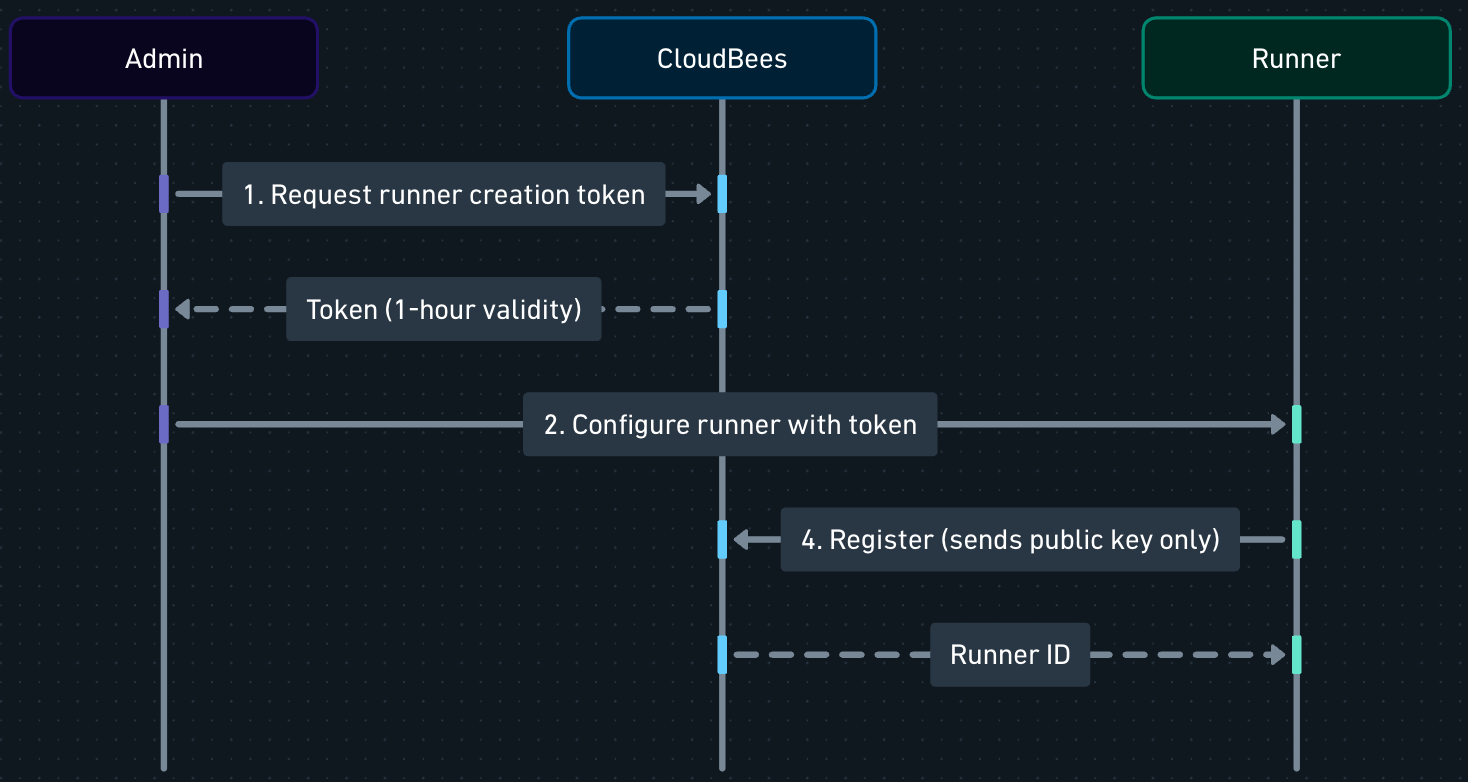
Initial registration
During one-time setup:
-
The organization administrator requests an Edge Runner creation toke (1 hour validity) from CloudBees Unify. (Token generation)
-
The runner is installed in the customer’s chosen location. (Runner installation)
-
The customer configures the runner, which triggers the local generation of an RSA keypair. (Runner configuration)
-
The public key and customer-provided metadata are sent to CloudBees Unify to register the runner, using the runner creation token to authenticate the registration request. (Runner registration)
Ongoing authentication
For all subsequent operations (polling and status updates):
-
The runner loads its locally stored private key.
-
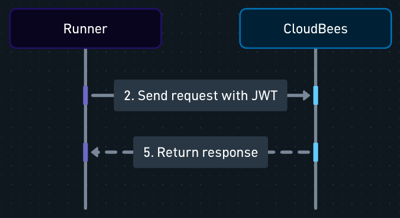
A JWT token is generated containing runner identification claims, with a one-minute expiration time.
-
The token is signed with the private key using the RS256 algorithm.
-
CloudBees Unify verifies the signature using the stored public key.
-
Claims are validated (expiration, issuer, and organization).
Key security properties include:
-
The private key never leaves the customer infrastructure.
-
Each request generates a fresh, short-lived token.
Cryptographic standards
The following table displays the cryptographic standards for authentication.
| Component | Standard | Details |
|---|---|---|
Key algorithm |
RSA |
4096-bit key length |
Signature algorithm |
RS256 |
RSA with SHA-256 |
Token format |
JWT |
RFC 7519 compliant |
Transport encryption |
TLS 1.2+ |
Industry standard |
Authorization model
-
Organization scoping: All runner operations are scoped to a specific organization, which is selected when the runner creation token is created.
-
Organization inheritance: Edge runners installed in an organization are automatically available to workflows in all suborganizations of that organization.
-
No cross-tenant access: Strict isolation prevents access to data of other organizations.
-
Label-based routing: Jobs are dispatched to runners based on matching labels.
-
Revocation: Edge runners can be deleted via API to invalidate all authentication.
Authentication flow diagrams
The following illustrations show the authentication sequence from initial registration through ongoing operations. The participants are as follows:
-
Admin
-
Runner as Edge runner
-
CloudBees Unify as CloudBees Unify
Initial registration:
Ongoing operations:
Network requirements
Edge runners require minimal network access:
| Rule | Protocol | Port | Direction | Destination |
|---|---|---|---|---|
Required |
HTTPS |
443 |
Outbound |
CloudBees Unify API, AWS S3, CloudBees Unify downloads site |
Not required |
Any |
Any |
Inbound |
N/A |
|
No inbound firewall rules are required. Edge runners only make outbound connections. |
The following endpoints must be reachable from the runner:
| Purpose | Hostname | Protocol | Port |
|---|---|---|---|
CloudBees Unify API |
api.cloudbees.io |
HTTPS |
443 |
AWS S3 log upload |
s3.us-east-1.amazonaws.com or s3.us-west-2.amazonaws.com |
HTTPS |
443 |
Workflow runtime binary download (native mode only) |
downloads.cloudbees.com |
HTTPS |
443 |
Runner binary download (autoupdates) |
downloads.cloudbees.com |
HTTPS |
443 |
|
Runners must be able to reach the AWS S3 endpoint to upload logs via pre-signed URLs. CloudBees Unify uses the us-east-1 and us-west-2 AWS regions. |
The runtime binary download endpoint is only required for runners that support native execution mode. In container mode, the runtime is consumed as a Docker image in the job definition.
CloudBees Unify services are hosted on major cloud providers. Specific IP ranges can be provided on request for environments that require IP-based firewall rules. For more information, refer to the allowlist documentation.
Private VPC installations:
The endpoints above apply to the multi-tenant CloudBees Unify environment (cloudbees.io). For private VPC installations, the Edge runner connects to your customer-specific CloudBees Unify VPC hostname instead of api.cloudbees.io.
Proxy support
Edge runners support corporate HTTP proxies, such as:
-
Standard
HTTP_PROXY,HTTPS_PROXY, andNO_PROXYenvironment variables, which the runner also passes to steps by default -
Proxy authentication, if required
-
SSL-inspecting proxies, with a trust bundle that makes steps trust the proxy’s certificate authority
For more information, refer to Configure Edge runners behind a corporate proxy.
Connection behavior
While running, Edge runners repeatedly poll CloudBees Unify, holding each polling request open for approximately forty-five seconds. The service returns a non-empty response to send jobs to the runner. When the runner receives a response, it immediately polls again, regardless of the content of the response. Fatal errors cause the runner to terminate (for example, an authentication failure caused by server-side runner deletion).
While executing jobs, Edge runners also make periodic API calls to CloudBees Unify to update job and step statuses.
Glossary
| Term | Definition |
|---|---|
Edge runner |
Lightweight agent deployed on customer infrastructure to execute CI/CD jobs |
JWT |
JSON Web Token - a compact, self-contained token format for authentication |
RSA |
Rivest-Shamir-Adleman - asymmetric cryptographic algorithm used for signing |
RS256 |
RSA Signature with SHA-256 - specific algorithm for JWT signing |
Polling |
Communication pattern in which a client repeatedly checks a server for updates |
TLS |
Transport Layer Security - cryptographic protocol for secure communication |