Application security posture management (ASPM) provides continuous visibility and control over security risks across the entire software development lifecycle. Understanding ASPM is essential for security leaders, development teams, and compliance officers who need to assess, prioritize, and respond to application risks systematically rather than reactively.
The application security visibility challenge
As applications become more complex and security responsibilities span multiple teams, comprehensive security visibility becomes increasingly difficult. Security teams struggle with fundamental questions: Which applications have the highest risk exposure? How effective are security investments? Are development teams meeting security objectives?
Multiple security tools operating in isolation create blind spots and coordination challenges. Development teams might run static analysis during commits, container scanning during builds, and dynamic analysis in test environments, but correlating findings across these tools requires manual effort. Without unified visibility, organizations resort to reactive security responses rather than systematic risk management.
What application security posture management provides
ASPM orchestrates individual security scanning tools to transform scattered security data into enterprise-wide risk visibility. Rather than replacing existing security tools, ASPM aggregates and contextualizes their outputs to enable systematic security governance.
Real-time asset inventory maintains continuously updated visibility into source code, binary artifacts, and infrastructure components across applications. Risk correlation and prioritization goes beyond raw scanner outputs to provide business-relevant security insights. For example, a critical library vulnerability becomes actionable when ASPM shows which production applications actually use that library. Security orchestration automatically triggers appropriate security analysis based on development activities without requiring manual coordination. Triage and tracking workflows provide interfaces for systematic finding review, business context assessment, and remediation progress tracking.
The CloudBees Unify ASPM model
CloudBees Unify implements ASPM through implicit security analysis that automatically triggers security scans when code or artifacts change. This approach reduces security friction by eliminating the need for development teams to explicitly invoke security tools while ensuring comprehensive coverage of security-relevant changes.
Implicit security analysis triggers automatically when:
-
New code commits are pushed to monitored repositories.
-
Container images are built and stored in registries.
-
Dependencies are updated in package managers.
-
Security scanning tools detect changes in the security posture.
The platform uses an asset data model that maintains near real-time inventory of source code and binary artifacts. When you create a component or link a repository, ASPM automatically begins tracking security-relevant changes to that asset. When workflows successfully complete with artifact publication steps, ASMP triggers appropriate binary analysis. This automated approach ensures security analysis happens consistently without depending on individual developer discipline.
Multi-tool correlation enhances security analysis accuracy by consolidating findings when multiple security scanners detect the same issue. Rather than presenting duplicate findings from different tools, ASPM correlates results across scanner types (SAST, SCA, container scanning, secret scanning) and provides consolidated views that reduce triage overhead. Multi-tool agreement typically indicates higher-confidence security findings that warrant prioritized attention, while single-tool findings may require additional verification. Historical scan comparison enables security trend analysis, showing whether security posture is improving or degrading over time across the application portfolio.
Integration with organizational structure enables security governance that scales with organizational complexity. ASPM respects the hierarchical organization model, allowing security policies and tool configurations to be set at appropriate organizational levels while permitting necessary customization for specific teams or projects. Security leaders can establish enterprise-wide security baselines while delegating operational security management to development teams.
Workflow integration connects security analysis to existing development practices rather than creating parallel security processes. Security findings appear in the same dashboards and interfaces that development teams use for other operational concerns. Remediation workflows integrate with existing code review, testing, and deployment processes rather than requiring separate security-specific procedures.
Risk management and security orchestration
ASPM enables enterprise-wide risk visibility that spans individual projects and teams. Security leaders can assess risk exposure across the entire application portfolio, identifying patterns that might not be visible when examining projects in isolation. For example, a widespread dependency vulnerability might affect dozens of applications, but its business impact depends on which applications are customer-facing, which handle sensitive data, and which have appropriate compensating controls.
Contextualized prioritization considers environment context alongside technical severity. Environment-based filtering lets you focus on production-related issues first, so that a finding in a production environment can be prioritized over a finding of equal severity in a development environment. This prevents all findings from being treated as equally urgent regardless of where they occur.
Security control enforcement operates through policy integration and service level agreement (SLA) management rather than blocking mechanisms that disrupt development velocity. ASPM can establish organizational policies about acceptable risk levels, required security tool coverage, or maximum time-to-remediation for different severity levels. These policies provide governance frameworks that enable consistent security outcomes while preserving development team autonomy.
Compliance and audit support emerges naturally from comprehensive security tracking rather than requiring separate compliance processes. ASPM maintains historical records of security analysis, remediation activities, and policy compliance that support audit requirements without additional administrative overhead.
ASPM integration with development workflows
ASPM fits into existing development practices by augmenting rather than replacing established workflows. Development teams continue using their preferred development tools, code review processes, and deployment pipelines. ASPM operates transparently within these workflows, providing security insights without disrupting development velocity.
Implicit analysis reduces security friction by eliminating the need for explicit security tool invocation. Developers commit code, create pull requests, and deploy applications using their normal processes. ASPM automatically triggers appropriate security analysis based on the nature of these activities, ensuring security coverage without requiring changes to development workflows.
Security center dashboards serve as operational interfaces for both security and development teams. Security professionals use these dashboards for risk assessment, policy enforcement, and audit preparation. Development teams use the same dashboards for understanding security requirements, tracking remediation progress, and demonstrating security compliance. This shared interface promotes collaboration rather than creating adversarial relationships between security and development teams.
Remediation is supported through manual triage in the Security dashboard and AI-assisted auto-remediation, enabling teams to assess and address findings without leaving the platform. Security findings include sufficient context to support remediation by linking to specific code lines and providing remediation guidance.
Organizational hierarchy and inheritance
Security tool configuration follows organizational hierarchy patterns that enable centralized governance with local flexibility. Understanding how security tool settings cascade through organizational structure helps you plan effective security coverage across complex organizational environments.
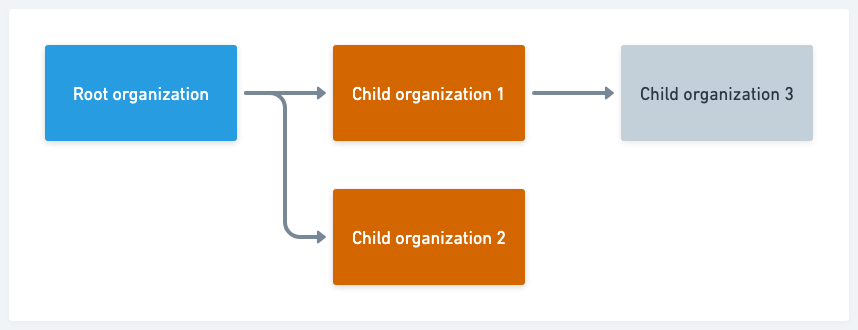
Enabling or disabling security tools, or implicit security assessment, operates at the organization level with inheritance behavior:
-
Changes made to the root organization affect all of its child organizations.
-
Below root organization level, changes made to an organization create an override record, such that changes to its parent do not affect that organization.
For example, enabling a security tool for the root organization would enable it for all three child organizations. If you then disabled it for Child organization 1, it would also disable it for Child organization 3.
Activating a different security tool for Child organization 1 would activate it for Child organization 3, unless that tool had already been deactivated for Child organization 3, which would have created an override record.
| Deactivating a security tool for the root organization disables it for all child organizations, irrespective of override records. |
Configuration inheritance behavior applies to tools that require integration setup, such as Black Duck SCA, Coverity on Polaris, and SonarQube. When you configure a tool, you can specify whether to allow child organizations to inherit that configuration, or require them to be configured separately.
This inheritance model balances centralized security governance with organizational autonomy. Parent organizations can establish security baselines while child organizations can adapt security tool configurations to their specific operational requirements. Configuration values set within child organizations are preserved even if inheritance is disabled and later re-enabled, ensuring that administrative settings remain stable through governance changes.