Administrators can grant the Eval DSL permission to specific users, groups, or service accounts, allowing them to evaluate DSL without requiring full administrator access.
A server administrator can:
-
Evaluate DSL and server-side JavaScript.
-
Author DSL and JavaScript in server-side script fields.
If required, an administrator can use the insecureAllowNonAdminsToRunDsl server setting to return to the earlier behavior.
For more information about enabling this setting, refer to Server settings.
Eval DSL access control
The Eval DSL system object controls which principals can evaluate DSL without full administrator access.
By default, the Eval DSL system object has no explicit access control list (ACL) entries and inherits the server ACL, just like the Administration system object.
Server administrators can already evaluate DSL and do not need the Eval DSL permission.
Security considerations
| Granting the Eval DSL permission is close to granting administrator access. Evaluated DSL runs inside the server under the server’s operating system account. Grant this permission only to principals you would trust with administrator-level access. |
Before you grant it, read Security considerations.
Access permissions
| Principal | Evaluate DSL | Evaluate JavaScript | Author server-side script fields |
|---|---|---|---|
Server administrators |
Yes |
Yes |
Yes |
Users, groups, or service accounts with the Eval DSL permission |
Yes, including in the DSL IDE and the DSL editor |
No |
No |
Everyone else |
No, unless the server setting is turned on |
No, unless the server setting is turned on |
No, unless the server setting is turned on |
To grant access for Eval DSL permission in the UI
-
Go to .
-
Select Eval DSL.
-
Select Add Privilege to grant access to users, groups, or service accounts.
-
Select Modify as Allow and then select Save.
Grant the Eval DSL permission using ectool
Run the following command for the principal type. Replace <name> with the name of the user, group, or service account.
ectool createAclEntry user <name> --systemObjectName evalDsl --modifyPrivilege allow ectool createAclEntry group <name> --systemObjectName evalDsl --modifyPrivilege allow ectool createAclEntry serviceAccount <name> --systemObjectName evalDsl --modifyPrivilege allow
To run evalDsl with --clientFiles, the principal also needs the Execute permission on the DSL Client Files system object.
|
Delete the Eval DSL permission in the UI
-
Go to .
-
Select Eval DSL.
-
Select Delete privilege from actions menu to delete the principal entry.
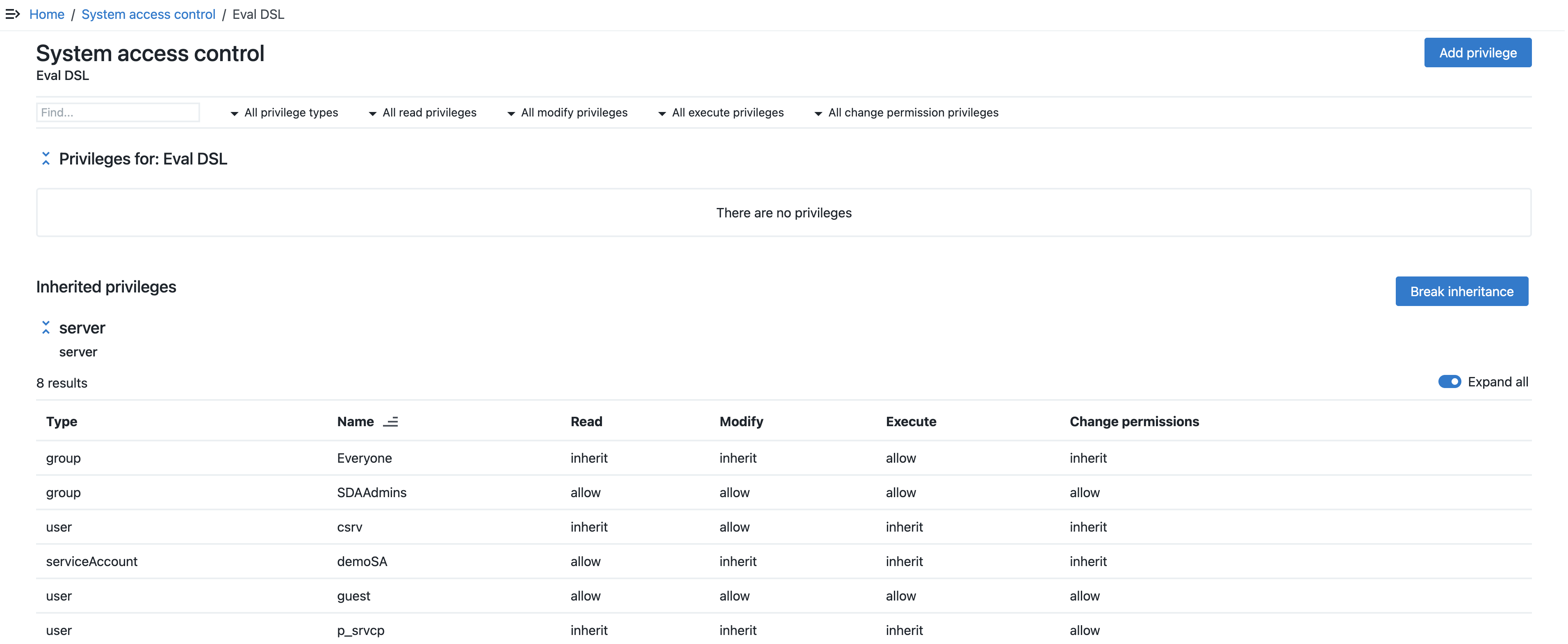
Delete the Eval DSL permission using ectool
To delete using the ectool, run:
ectool deleteAclEntry user <name> --systemObjectName evalDsl
For a group or service account, use group or serviceAccount instead of user.
If the principal also has administrator access, removing the Eval DSL permission doesn’t stop it from running DSL. For more information, see Security considerations.
Security considerations
Before you grant Eval DSL, consider the following:
-
Grant to users or groups, not projects: If you grant Eval DSL to a project, anyone who can add or edit steps in that project, or supply its parameters, can evaluate DSL. The grant applies to every job in that project, whoever starts it. It doesn’t apply to interactive calls. Granting to a specific user or group is the safer choice.
-
Non-administrative principal: A non-admin principal with Modify permission on the server access control list automatically receives the Eval DSL permission too.
-
Administrator access takes precedence: Denying Eval DSL to a principal doesn’t remove access from a principal that already has administrator access. To remove access from that principal, change its administrator permission instead.
-
Some actions still require administrator access: The Eval DSL permission doesn’t let a principal save server-side script fields, run
evalScript, or grant permissions.
Features affected
The Eval DSL permission affects the following features:
- DSL IDE
-
Evaluating DSL (the Execute action) requires administrator access or the Eval DSL permission.
- DSL editor
-
Saving or applying DSL requires administrator access or the Eval DSL permission. If the DSL sets server-side script fields, saving those fields requires administrator access even when the Eval DSL permission is granted. Server-side script fields include form parameter
optionsDsl,defaultValueDsl, andvalidationDsl, catalog itemdslString, and archive scripts. - Viewing or generating DSL
-
Viewing or generating an object’s DSL is read-only and isn’t affected.
- Other features that evaluate or author DSL
-
Features that rely on non-administrators evaluating or authoring DSL are also affected, including:
-
The DevOps Insight Git setup wizard
-
The self-service DSL import and create-application-from-package catalog items
-
EC-DslDeploy
-
DSL Git sync apply
-