Custom actions are reusable, self-contained units of automation that you package in a Git repository and invoke from any CloudBees Unify workflow. Understanding how custom actions are structured and executed helps you decide when to write one, how to scope it, and how to make it accessible to the teams that need it.
What is a custom action?
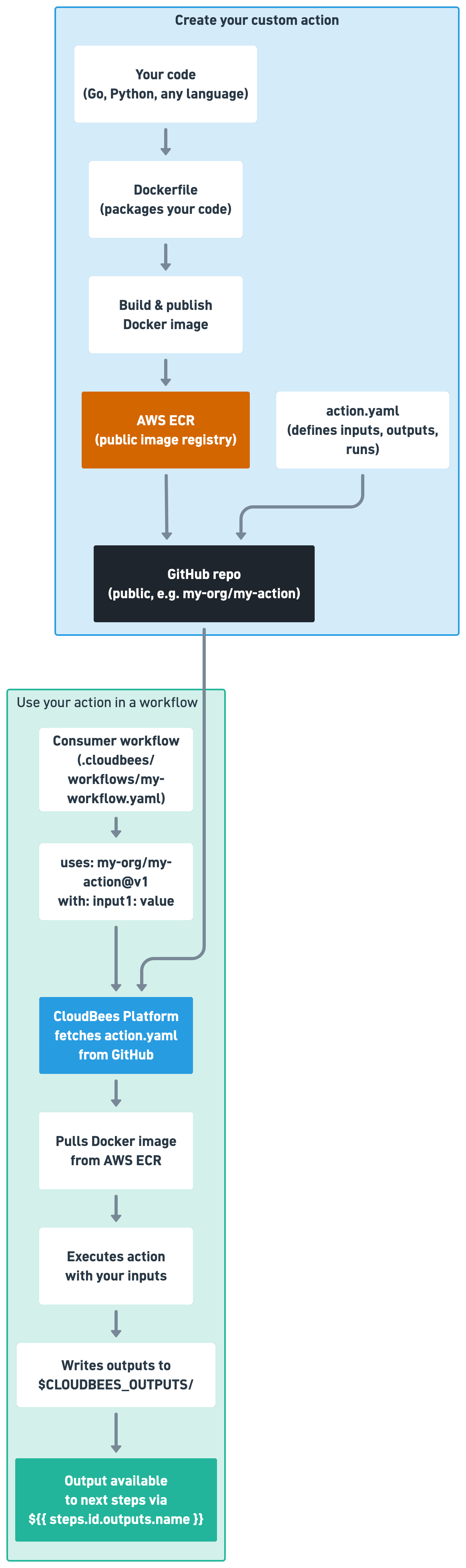
A custom action combines two things: a Git repository containing an action.yml file, and one or more Docker container images that execute the action’s steps.
The action.yml file defines the action’s name, inputs, outputs, and the steps to run.
The Docker image provides the execution environment, including the language runtime, tools, and dependencies the steps need.
Actions are language-agnostic. You can write action steps in any language, such as shell, Go, Python, or Java, as long as the Docker image you specify contains the necessary runtime.
Action scope and access
Whether your action’s repository and Docker image need to be public or private depends on who needs to use the action.
- Public actions
-
If you want your action to be usable by anyone on CloudBees Unify, both the Git repository and the Docker image it depends on must be publicly accessible. Any public container registry, for example Docker Hub, works for public actions.
- Private actions
-
If your action is intended only for use within your CloudBees Unify organization, the repository and Docker images can remain private. To grant CloudBees Unify access to a private repository, configure Git credentials. For private container images, CloudBees Unify supports configuring an Amazon Elastic Container Registry (ECR) integration for authenticating to your private ECR registry. CloudBees Unify does not support private registries hosted on any other cloud provider.
How actions are resolved
When a workflow step invokes a custom action using uses, CloudBees Unify resolves the action repository based on the reference format:
- GitHub shorthand
-
org/repo@refresolves fromgithub.com. For example,cloudbees-io/checkout@v1resolves togithub.com/cloudbees-io/checkoutat thev1tag. - Full URL
-
Actions hosted on GitLab, Bitbucket, Gerrit, or any other supported SCM require a full URL:
https://gitlab.com/<project>/<repo>@<ref>. - Default branch
-
Omitting the ref causes CloudBees Unify to resolve the action from the
mainbranch. Specifying a ref, such as a tag, branch, or commit SHA, is strongly recommended to prevent unexpected changes from affecting your workflows.
Context variables in actions
The full range of CloudBees Unify context variables is available inside action step definitions.
In addition, actions support the action.scm.sha variable in the uses field of their steps.
This variable resolves to the commit SHA of the repository being referenced in the workflow step that invoked the action.