Before enabling High Availability (HA), audit your jobs to understand which Pipeline capabilities support HA and which job types may need changes.
|
To get the most out of High Availability (HA) capabilities, CloudBees recommends testing your jobs in a non-HA controller environment first. Two Pipeline capabilities are relevant to HA:
Non-Pipeline projects such as Freestyle or Maven projects run in the replica where they started. Non-Pipeline project builds are aborted when the replica running them ends for any reason, such as a rolling restart or upgrade, and no other replica can take over the build. Therefore, no HA is provided for those jobs. |
|
By default, controllers set the Default Speed/Durability Level option to This option is required in HA to allow build adoption in case of a replica failure. An administrative monitor displays if you change this option at controller level or override it at the job level. |
Even though HA is not provided for non-Pipeline projects, High Scalability (HS) can be achieved by adding more replicas to the cluster. However, if auto-scaling is enabled for CloudBees CI on modern cloud platforms, the number of replicas can grow during periods of high workload and then shrink again once the workload returns to normal. When a scale-down removes a replica, non-Pipeline projects running on it are aborted and not adopted by other replicas.
|
The Declarative Pipeline Migration Assistant can help you migrate your Freestyle or Maven projects to Declarative Pipeline projects. |
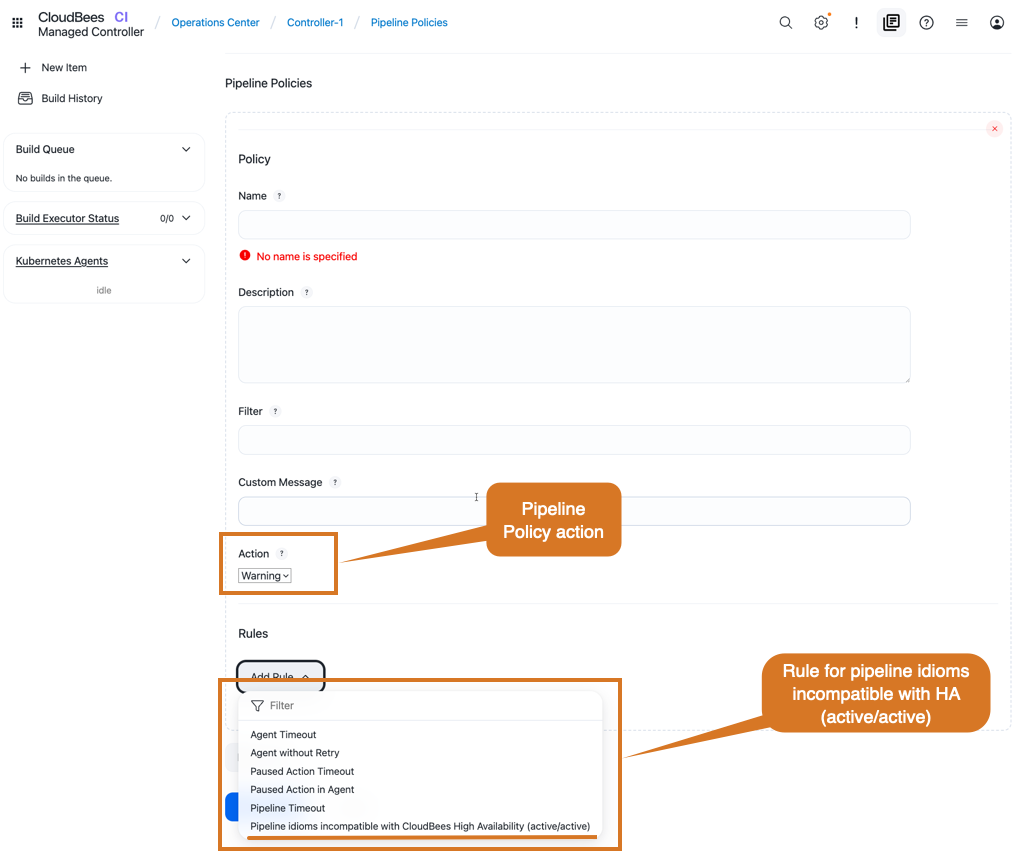
If you plan to use controllers running in HA mode, you can define Pipeline policies.
Use these to either warn developers about those incompatible steps (Warning policy), or to prevent developers from using them (Fail policy).
The rule used for this kind of policy is Pipeline idioms incompatible with Cloudbees High Availability (active/active), as displayed in the image below:
Refer to Enforce standards with Pipeline Policies for more information about how to define and apply pipeline policies to your controller.
Emulate the build step in HA controllers
The build step, provided by the Pipeline: Build Step plugin, does not support HA.
When used, CloudBees CI does not distribute the workloads among the replicas, and always executes the job in the replica where the build step is called.
If the upstream build is adopted, it may keep waiting indefinitely for the downstream build to finish.
Controllers running in HA mode can emulate the build step.
This emulation provides an alias for the build step with HA-compatible behavior.
This alias replaces all the Pipeline build steps in the Pipeline scripts with the build step emulation.
To enable build step emulation in a controller:
-
Select in the upper-right corner to navigate to the Manage Jenkins page.
-
Select CloudBees CI High Availability
-
Select Configure in the left pane.
-
For Pipeline build step, select Emulate.
-
Select Save or Apply.
|
If Emulation does not support all the
|
Emulate the lock step in HA controllers
The lock step, provided by the Lockable Resources plugin, does not support HA.
As of CloudBees CI 2.516.3.29358, controllers running in HA mode can emulate the lock step.
The lock step emulation supports locking ephemeral resources using the resource argument.
For example:
lock('my-resource-name') { // your pipeline steps here }
This emulation provides an alias for the lock step with HA-compatible behavior.
This alias replaces Pipeline lock steps with the lock step emulation.
To enable lock step emulation in a controller:
-
Select in the upper-right corner to navigate to the Manage Jenkins page.
-
Select CloudBees CI High Availability
-
Select Configure in the left pane.
-
For Pipeline lock step, select Emulate.
-
Select Save or Apply.
|
If Emulation does not support all options or behaviors of the |