When evaluating or installing plugins, it is helpful to know whether they are supported by CloudBees. Supported plugins are part of the CloudBees Assurance Program and have been verified to meet critical use cases, ensuring greater stability and security.
To help you quickly identify which plugins are supported, CloudBees adds a Supported badge to plugins in the Plugin Manager. Community-maintained and unknown plugins are not labeled with a Supported badge.
|
To find the support status for a plugin:
-
Select in the upper-right corner to navigate to the Manage Jenkins page.
-
Select Plugins.
-
Select the Updates, Available plugins, or Installed plugins tab.
-
In the search field, type the name of the plugin for which you want to find the support status.
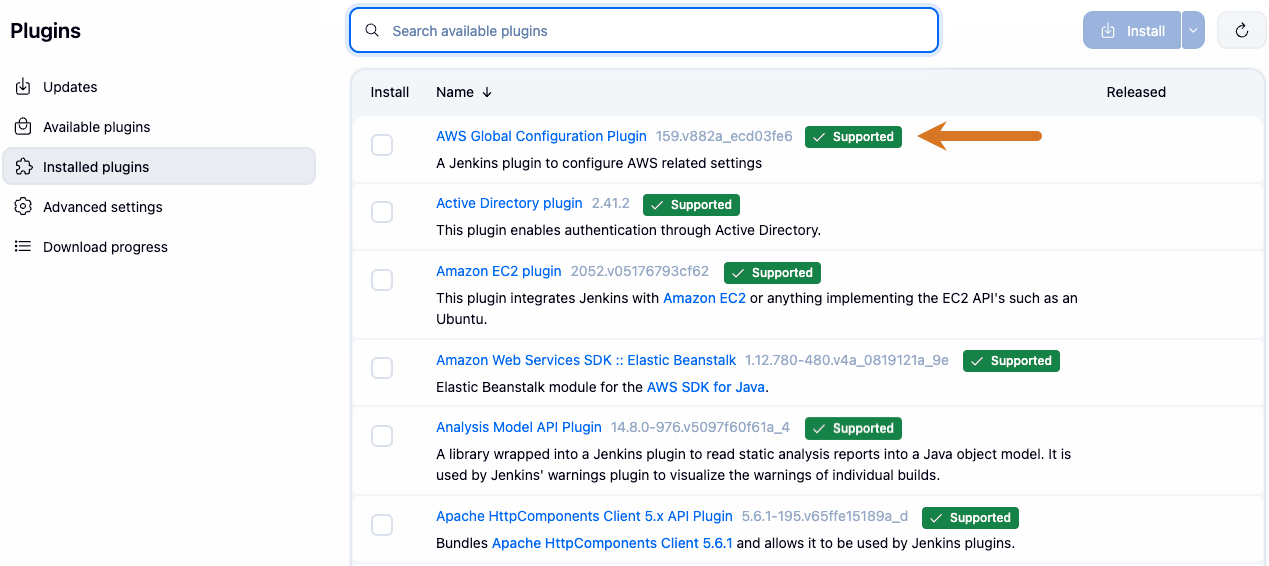 Figure 1. Plugin badges