CloudBees CI supports a range of agent connection modes in HA, but each agent must have only one executor. As an agent can connect to only a single replica at a time, agents with multiple executors cannot be properly shared, and are not supported by CloudBees CI High Availability (HA). Some cloud-agent plugins also have additional HA-specific lifecycle requirements beyond the executor count.
Cloud agent HA requirements
A single executor requirement is not a problem for cloud agents as they normally define only one executor. They are provisioned, use this executor, and are de-provisioned later.
Some cloud agent plugins have their own HA-specific configuration requirements:
Provision EC2 agents in HA
The Amazon EC2 plugin allows Jenkins to provision EC2 agents on demand.
When using this plugin in a controller running in HA mode, the following options must be selected in the Cloud configuration:
-
No delay provisioning
-
Clean up Orphan Nodes
-
Terminate idle agents during shutdown
-
Avoid Using Orphaned Nodes
Additionally, the Idle termination time setting must be configured according to the following guidelines:
-
If Maximum Total Uses is set to a value greater than
1, specify a shorter Idle termination time (for example, ~10 minutes). -
If using Minimum number of spare instances, specify a longer Idle termination time (for example, ≥ 60 minutes).
-
If Maximum Total Uses and Minimum number of spare instances are both set to
0, set the Idle termination time to 1 minute (the minimum supported value).
Using different settings for these options is not HA-compatible and may cause unexpected behaviors in HA controllers.
Provision Kubernetes agents in HA
The Kubernetes plugin allows Jenkins to provision agents on demand in a Kubernetes cluster.
The following Pod template settings are not HA-compatible and should not be used in controllers running in HA mode:
-
Time in minutes to retain agent when idle: In an HA controller, Kubernetes agents should be deleted immediately after completing their assigned task. Retaining agents after they become idle may result in orphaned agents if a controller replica exits for any reason.
-
Concurrency Limit: Limits the maximum number of agents the Kubernetes cloud can provision at once. In HA mode, this setting is not synchronized across controller replicas, which may allow agent provisioning to exceed the specified limit.
You can also limit the number of agents that can be provisioned leveraging the Kubernetes cloud capabilities. Refer to the official Kubernetes documentation for more information.
Provision GCE agents in HA
The Google Compute Engine plugin allows CloudBees CI to provision Google Compute Engine (GCE) agents on demand.
|
These settings are required when using the Google Compute Engine plugin in an HA controller. Using different settings is not HA-compatible and may cause unexpected behaviors in HA controllers. |
To configure the Google Compute Engine plugin for HA controllers:
-
Select in the upper-right corner to navigate to the Manage Jenkins page.
-
Select Clouds.
-
Next to the GCE cloud, select .
-
Under Instance Configurations, select the instance configuration to edit.
-
Configure the following options to ensure GCE agents, which are only visible to the replica they are connected to, are cleanly managed by replicas and used for a single build at a time:
-
Set Number of Executors to
1. -
Select Terminate idle agents during shutdown.
-
Under One-Shot, select Enabled.
-
-
If agent boot time is significant, configure Minimum Number of Spare Instances or Minimum Number of Instances to keep prewarmed agents available for immediate builds.
In an HA controller, these values apply per replica, not to the controller as a whole, so plan instance counts accordingly.
-
To restrict when minimum instance counts apply, select Only apply minimum number of instances during specific time range and configure the time range and days of the week.
Permanent agents as multiple-executor agents for HA
Agents require one executor to work with a controller running in HA mode. However, you can configure permanent agents to automatically generate single-executor agent clones that simulate the behavior of a multi-executor agent. To configure a permanent agent to simulate a multi-executor agent for HA, you can use one of the following methods:
Automatically from the GUI
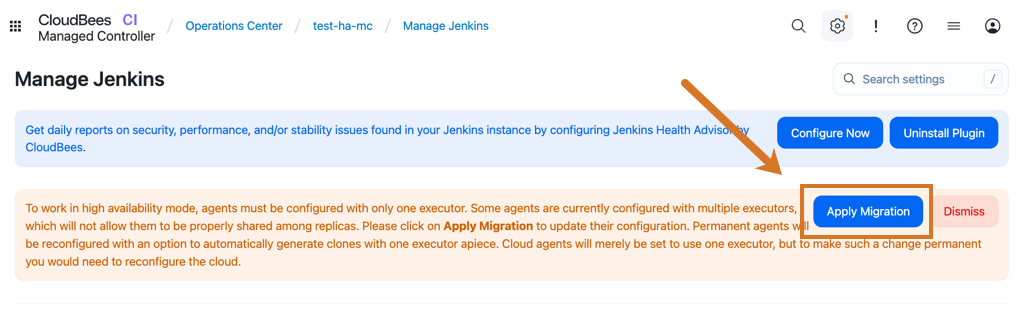
If the permanent agent has more than one executor, CloudBees CI displays an administrative monitor. If this administrative monitor displays, and you select Apply Migration, CloudBees CI automatically migrates the permanent agent configuration to the required configuration for HA.
Manually from the GUI
To manually configure your permanent agent to work with HA:
-
Navigate to the agent configuration screen.
-
Verify that the agent has only one executor.
-
In the Node Properties section, select the HA agent with multiple executors option, and set the number of executors according to your needs.
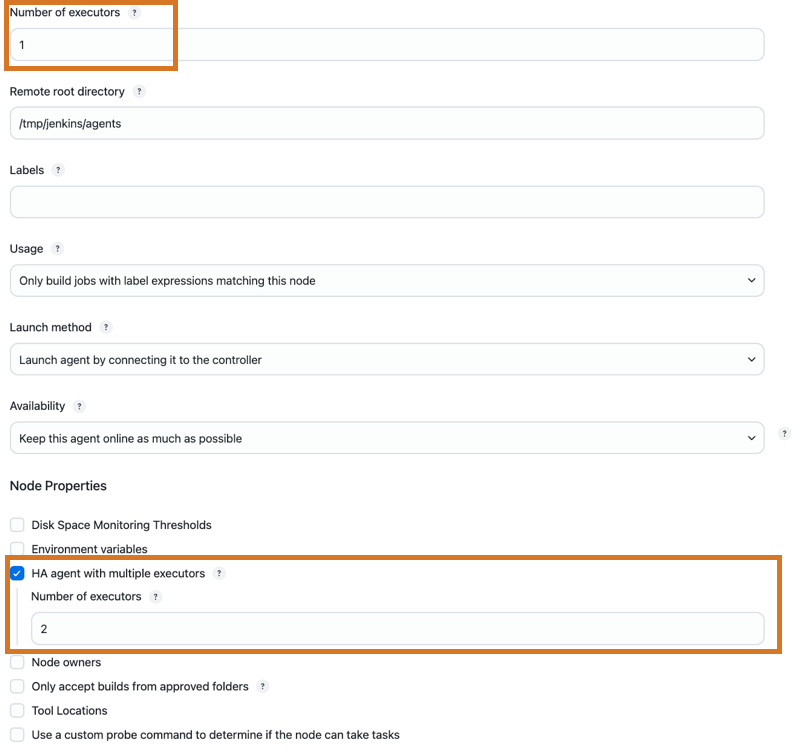
For outbound agents (usually SSH agents), from the configuration screen, select CloudBees High Availability for the Availability (retention strategy) field. The agent is kept offline until requested by a replica. CloudBees CI, when needed, brings the permanent outbound agent online temporarily.

|
CloudBees recommends using an outbound launch method for permanent agents in HA controllers. These agents set a direct connection between the replica and the agent and are simpler and more efficient than inbound agents where the requests from the agents must be routed to the correct replica. |
Using CloudBees Configuration as Code (CasC)
With Configuration as Code (CasC), you can configure a permanent agent as a multi-executor agent compatible with HA using code snippets similar to the examples below that display the non-HA compatible configuration and the changes required to make it HA compatible:
nodes: - permanent: ... launcher: inbound: {} name: <your-permanent-agent-name>(1) numExecutors: 3(2) ... retentionStrategy: "always"
| 1 | Replace <your-permanent-agent-name> with the name of your permanent agent. |
| 2 | Set the number of executors according to your needs. |
nodes: - permanent: ... launcher: inbound: {} name: <your-permanent-agent-name>(1) numExecutors: 1(2) nodeProperties: - cloudbeesHighAvailabilityMultipleExecutors:(3) numExecutors: 3(4) .... retentionStrategy: "always"
| 1 | Replace <your-permanent-agent-name> with the name of your permanent agent. |
| 2 | Set the non-HA option number of executors to 1. |
| 3 | Use the cloudbeesHighAvailabilityMultipleExecutors property to define the permanent agent as a multi-executor agent for HA. |
| 4 | Set the number of HA compatible single-executor clones according to your needs. |
nodes: - permanent: ... launcher: nioSsh: ... name: <your-permanent-agent-name>(1) numExecutors: 3(2) ... retentionStrategy: "demand"
| 1 | Replace <your-permanent-agent-name> with the name of your permanent agent. |
| 2 | Set the number of executors according to your needs. |
nodes: - permanent: ... launcher: nioSsh: ... name: <your-permanent-agent-name>(1) numExecutors: 1(2) nodeProperties: - cloudbeesHighAvailabilityMultipleExecutors:(3) numExecutors: 3(4) .... retentionStrategy: "cloudbeesHighAvailability"(5)
| 1 | Replace <your-permanent-agent-name> with the name of your permanent agent. |
| 2 | Set the non-HA option number of executors to 1. |
| 3 | Use the cloudbeesHighAvailabilityMultipleExecutors property to define the permanent agent as a multi-executor agent for HA. |
| 4 | Set the number of HA compatible single-executor clones according to your needs. |
| 5 | For outbound agents in HA controllers, set retentionStrategy always to cloudbeesHighAvailability. |
When configured properly, the controller clones the original agent to create the executors. These read-only clones are managed by the controller itself, which adds or removes clones and reconfigures them in response to updates to the original permanent agent.
All the permanent agent clones have one executor and use different folders within the executors folder inside the original permanent agent root directory.
Outbound agents automatically have the workDir settings for all the clones.
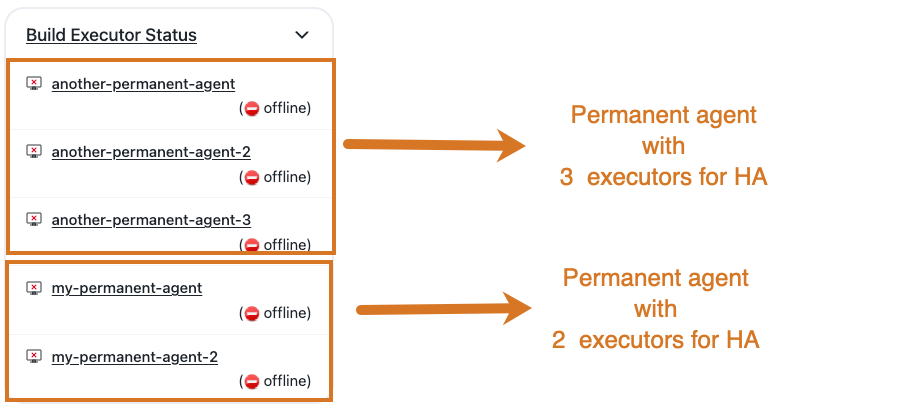
CloudBees CI displays the clones as individual one-executor agents in the Build executor status. Select Build executor status to open the dedicated HA agents view for a clearer display of agents.
|
Permanent outbound agents configured as multi-executor agents that use either If this strategy is selected, the connection to the read-only clones fails. |